Unlocking Professional Patterns with Botanical Stamp Brushes
Digital illustration often feels like a balancing act between creative freedom and technical efficiency. When you are trying to build a cohesive floral pattern or add delicate ornaments to a design, painting every single leaf and petal by hand can be exhausting and time-consuming. This is where Botanical Stamp Brushes become an essential asset in your digital toolkit. These tools are not just shortcuts; they are curated collections of shapes designed to help you construct beautiful, flower-themed patterns and ornamental designs with speed and consistency. However, simply downloading a pack does not guarantee a professional result. Many creators, from hobbyists to seasoned entrepreneurs, fall into traps regarding how they select, apply, and integrate these stamps into their workflow.
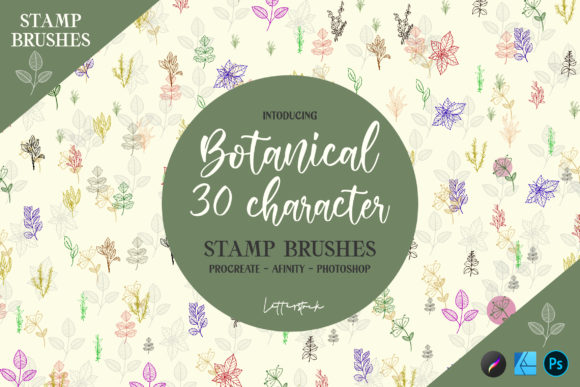
The primary appeal of this specific pack lies in its variety. Inside the zip file, you will find 30 distinct stamp brush characters. This diversity allows for complex layering without the design feeling repetitive or mechanical. Whether you are working in Procreate, Photoshop CC, or Affinity Designer, the goal is to enhance your design's aesthetic while maintaining a natural flow. Yet, a common misunderstanding is treating these stamps as "one-click solutions" that require no artistic input. When users rely too heavily on the default settings, the resulting artwork can look flat, disjointed, or obviously digital. To avoid this, one must approach botanical stamps with the same intentionality used in traditional painting.
Avoiding the Trap of Repetitive Patterns
One of the most frequent mistakes designers make when using botanical stamps is creating obvious repetition. Because the pack contains a finite number of shapes—30 in this case—it is tempting to stamp them in a grid or a predictable sequence. This kills the organic feel that botanical art requires. Nature is chaotic and varied; no two flowers bloom in exactly the same orientation or scale. When a pattern looks too uniform, it loses its charm and can appear cheap, which is detrimental if you are selling these designs as assets, printing them on merchandise, or using them for client branding.
To correct this, you must embrace variation. Do not just click and drag. Instead, treat each stamp as a building block. Rotate the brushes slightly for every application. Adjust the size subtly so that some flowers appear closer to the viewer while others recede into the background. Most modern software like Procreate and Affinity Designer allows for easy transformation of stamped elements immediately after placement. By mixing the different shapes within the pack rather than sticking to one favorite, you create a richer tapestry. Think of the 30 characters as a palette of ingredients; a great dish rarely uses only one ingredient repeatedly.
Misunderstanding Layering and Depth
Another area where users often stumble is the lack of depth in their compositions. A common error is placing all botanical stamps on a single layer with uniform opacity. This results in a design that looks like a sticker sheet rather than an integrated illustration. When elements do not interact with each other through shadow, light, and overlap, the design fails to capture the viewer's attention. For entrepreneurs and marketers, this lack of polish can undermine the perceived value of a product or campaign.
The solution is to utilize layers strategically. Place your larger, focal botanical stamps on lower layers and build up with smaller details on top. Use the eraser tool gently on the edges of some stamps to simulate petals tucking behind leaves or other blooms. Furthermore, experiment with blending modes. Changing a layer from "Normal" to "Multiply" or "Overlay" can instantly integrate the stamp's color with the background texture, making it feel painted rather than pasted. This technique is particularly effective in Photoshop CC but works equally well in Procreate and Affinity Designer. By manually adjusting the interaction between the 30 available shapes, you transform a simple stamp collection into a custom, high-end illustration.
Compatibility and Technical Oversight
Before diving into creation, it is vital to address the technical side of acquiring and using these tools. A significant oversight occurs when users download brush packs without verifying compatibility with their specific software version. While this pack supports Procreate, Photoshop CC, and Affinity Designer, the installation process differs for each. Installing a Photoshop brush file directly into Procreate, for instance, will not work and can lead to frustration. Additionally, some users ignore the resolution settings of their canvas. If you are designing for large-format print but working on a low-resolution canvas, even the highest quality botanical stamps will appear pixelated upon export.
Always check the file formats included in the zip folder before purchasing or downloading. Ensure you are extracting the files to a location you can easily access on your device. For iPad users working in Procreate, remember that brushes must be imported via the "Import" function in the Brush Library, not just saved to the camera roll. For desktop users in Affinity or Photoshop, locating the correct directory for custom brushes is key. Taking five minutes to read the included documentation or watching a quick tutorial on installation can save hours of troubleshooting later. This attention to detail ensures that the tool works for you, rather than becoming a source of technical friction.
Maximizing Efficiency Without Sacrificing Quality
The ultimate goal of using Botanical Stamp Brushes is to streamline your workflow without compromising the unique voice of your brand or art. Some creators swing too far in the opposite direction, avoiding stamps entirely due to a fear that their work won't look "authentic." This hesitation often leads to burnout and slower turnaround times, which is unsustainable for freelancers and small business owners managing tight deadlines. The reality is that professional artists have used stamps and textures for decades; the authenticity comes from how you manipulate the tools, not whether you use them.
Adopt a hybrid approach. Use the botanical stamps to lay down the foundational structure of your pattern or ornament. Once the composition is set, go in with standard drawing brushes to add hand-painted details, veins on leaves, or highlights on petals. This combination leverages the speed of the 30 stamp characters while retaining the human touch that clients and audiences appreciate. It allows you to produce high-volume work, such as social media graphics or packaging designs, while maintaining a bespoke quality.
In conclusion, these botanical tools offer a fantastic opportunity to elevate your design projects, provided they are used with thoughtfulness. By avoiding rigid repetition, mastering layering techniques, ensuring technical compatibility, and blending automation with manual refinement, you can create stunning floral themes and ornaments. Whether you are a beginner looking to make your first pattern or a professional seeking to optimize your pipeline, the key lies in experimentation. Do not be afraid to break the "rules" of how a stamp is supposed to look. If you have any questions about specific applications or need clarification on installing these items in your preferred software, feel free to reach out. Your journey to creating good-looking, efficient designs starts with understanding the potential hidden within these 30 unique characters.