Unlocking Creative Potential with Starlight Stamp Brushes for Procreate
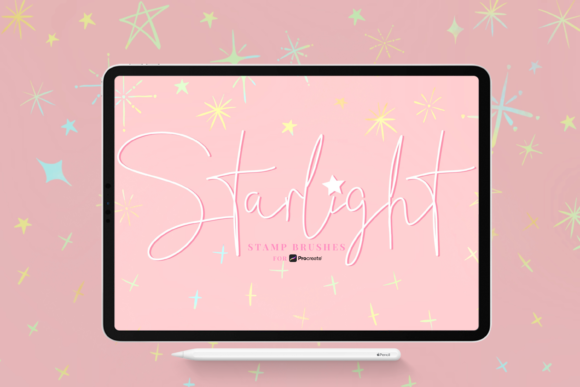
Digital art often feels like a balancing act between technical precision and organic expression. Whether you are a freelance illustrator rushing to meet a client deadline, a small business owner designing social media graphics, or a hobbyist looking to add some magic to your digital journal, the tools you choose define the speed and quality of your output. This is where Starlight Stamp Brushes come into play. Specifically designed for the Procreate ecosystem, this collection of 27 hand-drawn star stamp brushes offers more than just simple shapes; it provides a versatile toolkit for decorating, coloring, adding texture, and creating intricate patterns that elevate any design project.
The core appeal of the Starlight Stamp Brushes lies in their adaptability. Unlike static PNG stickers that lose quality when resized or look flat against a textured background, these brushes integrate seamlessly into your workflow. Because they are native to Procreate (requiring version 5 or later), they respond to pressure, opacity, and size changes just like your standard drawing tools. This means you can create a subtle, faint sparkle in the background of a portrait or a bold, opaque constellation map for an educational infographic with the same set of tools. The ability to recolor them instantly allows you to match brand guidelines or mood boards without needing to edit individual layers in post-production.
Real-World Applications for Creators and Entrepreneurs
For entrepreneurs and marketers, visual consistency is key to brand recognition. Imagine you run an online boutique selling handmade jewelry. Your product photos are great, but your Instagram stories need that extra "pop" to stop the scroll. Using the CF Starlight brush set, you can quickly overlay hand-drawn stars around your product images. Because the brushes are neatly labeled and imported in one go via the .brushset file, you aren't wasting valuable time searching through folders during a live sale or a time-sensitive campaign. You can combine different star sizes to create a custom border or use a single large star as a bullet point in your promotional text. The result is a cohesive aesthetic that feels personal and crafted, rather than generic and templated.
Educators and publishers also find immense value in these resources. When creating digital worksheets, e-books, or presentation slides, visual engagement helps retain attention. A teacher creating a reward chart for students can use these stamps to create unique, colorful stars that signify achievement. Since the brushes allow for easy opacity adjustments, they can be used as watermarks on downloadable PDFs to protect intellectual property without obscuring the content beneath. The hand-drawn nature of the 27 brushes ensures that the materials feel approachable and human, which is often missing from sterile, computer-generated clip art.
Enhancing Personal Projects and Digital Journaling
Beyond professional obligations, many adults use digital art as a form of stress relief and personal organization. Digital journaling has exploded in popularity, and users are constantly seeking ways to make their planners unique. The Starlight Stamp Brushes are perfect for this scenario. You might use a specific brush to mark important dates, create a "mood tracker" key using different star colors, or simply decorate the margins of your daily log. The ability to change the size and opacity means you can build depth; layering a large, low-opacity star behind a smaller, high-contrast one creates a glowing effect that adds dimension to your pages.
Consider the scenario of a traveler documenting their trip in a digital scrapbook. Instead of relying on pre-made stickers that everyone else uses, they can use these brushes to draw custom constellations over night sky photos taken during their journey. By adjusting the color to match the hue of the moonlight in the photo, the integration looks seamless. This level of customization transforms a simple photo album into a piece of art that tells a story, leveraging the texture and variety inherent in the hand-drawn strokes of the brush set.
Technical Advantages and Workflow Efficiency
One of the most frustrating aspects of downloading digital assets is the installation process. Often, users receive a zip file containing dozens of individual .brush files that must be imported one by one. The Starlight Stamp Brushes solve this pain point by utilizing the .brushset format. This specifically Procreate-native format allows you to import all 27 brushes in one go. For a busy freelancer or a student working on a tight schedule, this efficiency cannot be overstated. It gets you from download to creation in seconds, removing the friction that often leads to unused asset libraries.
Furthermore, the organization of the file matters. These brushes are neatly labeled within the Procreate file, meaning you aren't left guessing which brush creates a dotted outline versus a solid fill. This logical structure supports a faster creative flow. When you are in the "zone," hunting for the right tool breaks your concentration. Having a reliable, well-organized set like Starlight Stamp Brushes ensures that your technical setup supports your creativity rather than hindering it.
What to Consider Before Integrating New Tools
While the benefits are clear, it is important to approach new digital tools with a strategy. Before downloading or purchasing the CF Starlight set, consider your current workflow. Do you primarily work in Procreate? Since this set is exclusively for Procreate version 5 and above, it will not function in Photoshop, Clip Studio Paint, or other raster software. Ensuring your software is up to date is the first step to avoiding compatibility issues.
Additionally, think about how you intend to use the stamps. While they are incredibly versatile, they shine brightest when used to add texture and organic imperfections to digital designs. If your style relies heavily on perfect geometric vectors, these hand-drawn elements might offer a contrasting texture that needs to be balanced carefully. However, for most users looking to soften their digital aesthetic or add a touch of whimsy, this contrast is exactly what is needed. It is also worth noting that because these are brushes and not vector shapes, scaling them up infinitely may eventually reveal pixelation, though within standard canvas sizes for social media and print, the resolution remains crisp and professional.
Ultimately, the decision to incorporate Starlight Stamp Brushes into your library comes down to the desire for efficiency and uniqueness. In a digital landscape saturated with identical templates, having a tool that allows you to quickly generate custom, hand-drawn elements gives you a competitive edge. Whether you are branding a startup, teaching a class, or simply enjoying a quiet evening of digital painting, these 27 brushes provide the flexibility to decorate, color, and pattern your way to a distinct visual identity. They bridge the gap between the speed of digital production and the soul of traditional illustration, making them a practical investment for anyone serious about their creative output.