Unlocking Holiday Creativity with 85 Procreate Christmas Brushes
The holiday season often brings a unique pressure for creatives. Whether you are a freelance illustrator trying to meet a December deadline, a small business owner launching a winter sale, or a hobbyist wanting to send personalized digital cards, the demand for festive visuals spikes dramatically. This is where a specialized toolset like the 85 Procreate Christmas Brushes becomes more than just a download; it becomes a workflow saver. This collection isn't just about having a picture of a snowflake; it's about having the right texture, silhouette, and pattern to create professional-grade winter art directly on your iPad without starting from scratch.
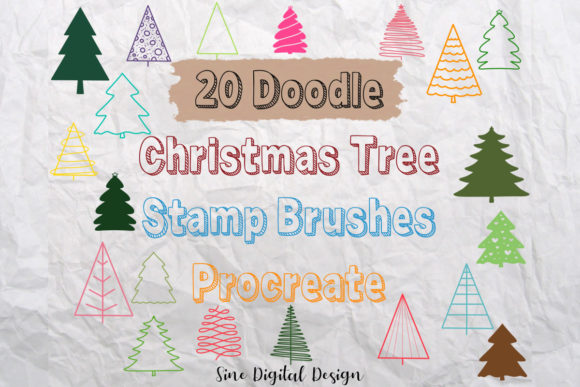
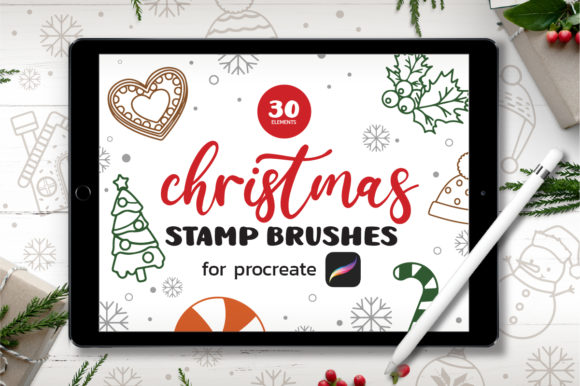
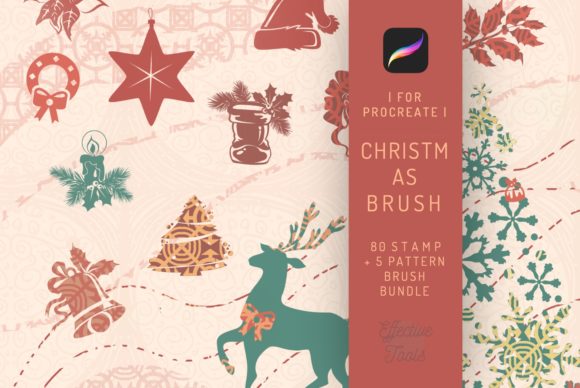
At its core, this package offers a comprehensive suite of digital tools designed specifically for the iOS ecosystem. It includes 85 distinct brushes alongside 80 stamp brushes and 5 pattern brushes. For those unfamiliar with how these function in practice, the distinction matters. The standard brushes allow for freehand drawing—perfect for sketching whimsical trees or adding hand-lettered greetings. The stamp brushes, however, are time-savers. Imagine needing to scatter holly leaves across a background or populate a scene with falling gifts. Instead of drawing each one individually, you tap the screen, and the detailed silhouette appears instantly. The inclusion of pattern brushes means you can draw a continuous border of icicles or wrapping paper textures with a single stroke, maintaining perfect consistency that would take hours to replicate manually.
Real-World Applications for Freelancers and Small Businesses
For freelancers and entrepreneurs, time is literally money. During the fourth quarter, clients often request urgent holiday-themed assets for social media campaigns, email headers, or product packaging. Using the 85 Procreate Christmas Brushes allows a marketer to turn around a concept in minutes rather than hours. Consider a boutique clothing brand needing Instagram stories to announce a "Winter Wonderland" sale. A designer can use the silhouette brushes to create stark, elegant overlays on product photos, or use the texture brushes to give a digital advertisement a cozy, knitted feel that resonates with viewers scrolling through cold feeds.
Small business owners who sell digital products, such as planners or printable wall art, also find immense value here. Creating a seasonal edition of a planner requires cohesive decorative elements. With the 5 included pattern brushes, a creator can generate seamless backgrounds for cover pages. The stamp brushes serve as excellent embellishments for weekly spreads, allowing users to mark holidays or add festive flair to their notes. Because these brushes are optimized for Procreate 4 and higher, they leverage the app's smoothing and stabilization features, ensuring that even quick sketches look polished and intentional.
Educational and Personal Creative Uses
Beyond commercial use, these tools open doors for educators and parents looking to engage children in creative projects. Digital storytelling is a growing field in education, and students can use these brushes to illustrate their own holiday stories. The variety of decorations, from ornaments to gifts, provides a vocabulary of visual elements that help young artists compose complex scenes without getting frustrated by difficult details. An art teacher might assign a project where students design their own wrapping paper using the pattern brushes, teaching concepts of repetition and symmetry in a fun, low-stakes environment.
For the everyday user or hobbyist, the appeal lies in personalization. Sending a generic e-card is fine, but creating a custom illustration for a friend or family member carries significantly more emotional weight. You might use the tree and gift brushes to compose a scene that references an inside joke, or use the snow textures to set a specific mood. The fact that these brushes include motifs suitable for tattoo designs adds another layer of utility. Tattoo artists or enthusiasts exploring flash sheet ideas can use the high-contrast silhouettes to visualize how traditional holiday symbols might look as permanent ink, testing composition and scale before committing to skin.
Technical Compatibility and What to Consider Before Downloading
Before diving into creating, it is crucial to understand the technical boundaries of this toolset. These brushes are engineered exclusively for the iPad Pro and other compatible iPads running the Procreate app. They utilize specific rendering engines within Procreate that do not translate to desktop software. It is important to emphasize that these brushes DO NOT WORK IN PHOTOSHOP or other applications like Clip Studio Paint or Affinity Designer. Attempting to import them elsewhere will result in errors or non-functional files. This limitation ensures that the brushes perform optimally within their intended environment, taking full advantage of the Apple Pencil's pressure sensitivity and tilt recognition, but it does require the user to be committed to the iPad workflow.
When choosing to integrate this brush set into your library, consider your current project pipeline. If you primarily work in vector-based software for print production, these raster-based brushes might require a different approach to scaling. However, for anything destined for screens—social media, web banners, digital invitations—the resolution and texture provided by these 85 brushes are ideal. The package comes with an instruction guidebook, which is often overlooked but vital. This guide helps users understand how to adjust settings like grain, flow, and size limits to customize the look of each stamp or stroke, turning a preset tool into a personalized instrument.
Maximizing the Value of the Brush Set
To truly benefit from the 85 Procreate Christmas Brushes, users should experiment with layering. The magic of digital art in Procreate lies in the ability to stack effects. You might start with a base shape using a standard brush, then overlay a texture stamp to give it a worn, vintage look, and finally add a glow effect using a lighter color variant of the same brush. The 80 stamp brushes offer enough variety to prevent repetition; instead of using the same snowflake ten times, you can rotate through different designs to keep the composition dynamic.
Furthermore, the instant download nature of the product means there is no waiting for shipping or physical materials. Once downloaded, the brushset consisting of 30 core brushes (categorized within the larger 85 count) is ready to use immediately. This immediacy is perfect for last-minute projects or sudden bursts of inspiration during the holiday rush. Whether you are designing a logo for a seasonal pop-up shop, illustrating a children's book about winter, or simply doodling to relax after a long day, having a dedicated library of holiday assets removes the friction of creation.
In a digital landscape saturated with generic clip art, owning a specialized, high-quality brush set allows for a level of authenticity that stands out. The silhouettes are clean, the textures are rich, and the variety covers everything from subtle decorations to bold statement pieces. By understanding where and how to apply these tools—respecting their platform limitations while leveraging their creative potential—users can elevate their holiday content from standard to spectacular. The key is not just having the brushes, but integrating them into a workflow that values speed, quality, and personal expression.