Mastering Jewelry Design Workflows with 70 Procreate Diamonds Stamp Brushes
In the fast-paced world of digital illustration and product design, efficiency often dictates the quality of the final output. For professionals working in jewelry design, tattoo artistry, or luxury branding, the ability to render complex gemstones quickly without sacrificing realism is a critical skill. This is where the 70 Procreate Diamonds Stamp Brushes bundle becomes an essential asset in your creative toolkit. Unlike generic shape tools, this specialized collection is engineered specifically for the iOS ecosystem, offering a streamlined process for integrating high-fidelity diamond, gem, and jewel motifs into broader design projects.
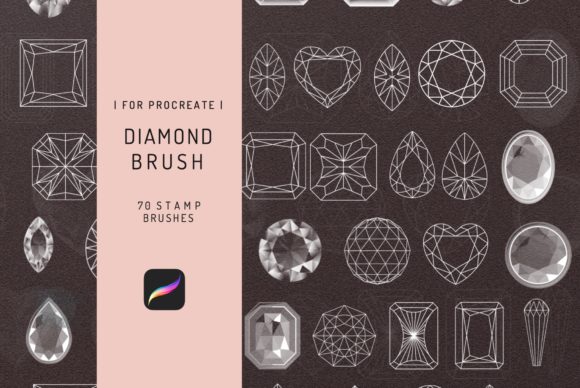
Understanding how to integrate these brushes requires more than just downloading a file; it involves recognizing where they fit within a professional workflow. Whether you are sketching a custom engagement ring, designing a logo for a boutique jeweler, or creating flash sheets for a tattoo studio, the implementation of these assets changes the trajectory of your production timeline. The bundle includes seventy distinct stamps ranging from line icons and contour outlines to fully rendered gemstone textures. By leveraging this variety, creators can move rapidly from concept to client-ready presentation.
Strategic Integration in the Design Process
The utility of the 70 Procreate Diamonds Stamp Brushes extends across multiple phases of a project. In the initial planning stage, speed is paramount. When brainstorming layouts for a jewelry catalog or mapping out a sleeve tattoo, artists often get bogged down by repetitive detailing. Using pre-made stamp brushes allows you to block out compositions instantly. You can place a cluster of diamonds to test visual balance or arrange a row of gemstones to evaluate spacing before committing to hand-drawing every facet. This "blocking" phase saves hours of manual labor, allowing you to focus on the macro composition rather than micro-details too early in the process.
During the execution phase, these brushes serve as both foundational elements and finishing touches. For tattoo artists, the Gemstone Brush pack offers precise line work that translates well to stencil creation. The contour and line icon styles provide clean vectors that can be traced or used directly as reference points for needle work. Conversely, for digital painters creating marketing materials, the fully shaded diamond stamps can be layered over flat illustrations to add immediate depth and luxury appeal. The key to effective implementation here is layer management. By keeping stamp elements on separate layers, you retain the flexibility to adjust hue, saturation, and brightness to match the lighting conditions of your specific scene.
Post-production is another area where this bundle adds significant value. Consistency is a hallmark of professional branding. If you are a small business owner creating social media content for a jewelry line, using the same set of diamond stamps ensures a cohesive visual identity across all posts. Instead of drawing a new gem for every graphic, you can reuse and recolor assets from the Diamonds Set, ensuring that your brand's representation of quality remains uniform. This consistency builds trust with your audience and streamlines your content calendar.
Technical Compatibility and Workflow Constraints
A crucial aspect of implementing any digital tool is understanding its technical boundaries. It is vital to note that the 70 Procreate Diamonds Stamp Brushes Bundle is exclusively designed for the iPad Pro running Procreate version 4 or higher. These brushes utilize the proprietary rendering engine of the Procreate app to achieve their specific texture and blending effects. Consequently, they DO NOT WORK IN PHOTOSHOP or other desktop-based applications. Attempting to import these files into incompatible software will result in errors or non-functional assets.
This limitation necessitates a mobile-first or hybrid workflow. Professionals accustomed to desktop-centric processes may need to adapt their routine. A common effective workflow involves starting the conceptual phase on the iPad using these brushes for rapid iteration, then exporting high-resolution PNGs or PSD files to a desktop environment for final typesetting or large-format printing. Recognizing this boundary prevents frustration and ensures that you allocate the right tool to the right stage of the pipeline. For educators teaching digital design, emphasizing this compatibility requirement is essential to prevent student confusion during assignment execution.
Maximizing Efficiency with Organization and Customization
To truly benefit from a library of seventy brushes, organization is key. Upon instant download, the package includes an instruction guidebook. Skipping this resource is a missed opportunity for optimization. The guidebook often contains tips on brush settings, such as opacity flow and grain adjustments, which can drastically alter the look of a stamp. Before diving into a client project, take time to create a dedicated "Gem Library" canvas. Test each of the seventy brushes to understand their unique characteristics. Identify which ones work best for white gold settings versus yellow gold, or which contour lines hold up best at small scales for tattoo flash.
Customization further enhances the utility of the Jewelry Design 70 Procreate Diamonds Stamp Brushes Bundle. While the stamps are ready to use, their true power lies in modification. Use Procreate's blending modes to integrate the gems seamlessly into your artwork. For instance, setting a diamond stamp to "Overlay" or "Color Dodge" can simulate light reflection on a metallic surface more realistically than a standard opaque stamp. Freelancers can save these customized combinations as new assets, effectively expanding their personal library beyond the original seventy options. This practice of iterative improvement turns a static purchase into a dynamic, evolving resource.
Practical Use Cases Across Industries
The versatility of this brush pack supports a wide range of professional applications:
- Tattoo Artists: Use the line icon and contour brushes to create precise stencils for geometric jewelry tattoos. The variety in cut styles (round, princess, emerald) allows for accurate client consultations.
- Marketing Agencies: Rapidly prototype packaging designs for luxury goods. Drop in diamond stamps to visualize where embossing or foil stamping might occur on a box layout.
- Educators and Bloggers: Create engaging tutorial content or blog headers related to luxury lifestyles without needing advanced 3D modeling skills. The stamps provide instant visual interest.
- Small Business Owners: Design logos and watermarks for photography or boutique stores. The jewel motifs convey elegance and high value immediately.
For entrepreneurs, the time saved by using these stamps translates directly to billable hours. Instead of spending three hours drawing a single intricate ring, you can complete the illustration in thirty minutes, allowing you to take on more clients or focus on business development. The Instant download feature means there is no waiting period; you can integrate these tools into your workflow the moment inspiration strikes.
Quality Control and Long-Term Value
Maintaining high standards is non-negotiable in professional design. When using stamp brushes, there is a risk of artwork looking "stamped" or repetitive if not handled carefully. To mitigate this, vary the size, rotation, and color of the gems within a single piece. Combine the 70 Procreate Diamonds Stamp Brushes with hand-drawn elements. Use the stamps for the stones themselves, but draw the metal settings and chains manually. This hybrid approach retains the efficiency of the brushes while preserving the organic feel of hand-crafted art.
Furthermore, regular audits of your brush library ensure long-term usability. As Procreate updates its software, occasionally re-test your favorite brushes to ensure they perform as expected. The included instruction guidebook serves as a reference point for troubleshooting any shifts in behavior after an app update. By treating these brushes as a core component of your operational infrastructure rather than a novelty, you ensure consistent output quality over months and years of use.
In conclusion, the 70 Procreate Diamonds Stamp Brushes Bundle is more than a collection of images; it is a workflow accelerator. By understanding its specific compatibility with iPad Pro, respecting its limitations regarding Photoshop, and strategically integrating it into your planning, execution, and refinement stages, you can significantly elevate your productivity. Whether you are crafting a tattoo motif or designing a high-end jewelry advertisement, these tools provide the precision and efficiency needed to meet professional demands in a competitive market.