Evaluating the Utility of 15 Chalk Texture Photoshop Stamp Brushes for Digital Art and Design
In the evolving landscape of digital design, the pursuit of authentic, organic textures remains a priority for professionals and hobbyists alike. While vector graphics and clean lines dominate modern UI and web design, there is a persistent demand for tactile elements that introduce warmth and imperfection into a composition. The 15 Chalk Texture Photoshop Stamp Brushes collection, alongside its successor Chalk Texture Photoshop Stamp Brushes Vol.2, represents a specific category of resources designed to bridge the gap between sterile digital canvases and traditional media. These tools are not merely decorative; they serve as functional assets for photo manipulation, game asset creation, and complex visual effects.
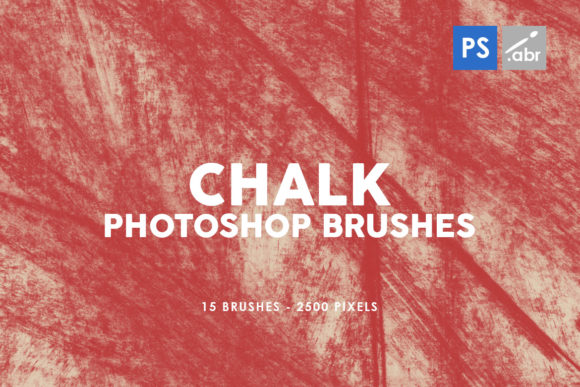
Understanding the distinct value of these brushes requires looking beyond the surface-level promise of "texture." This set includes 15 high-resolution stamp brushes, each rendered at 2500 pixels. This resolution is a critical specification that distinguishes professional-grade assets from lower-quality freebies often found online. For designers working on large-format prints or high-definition screens, a brush that pixelates upon scaling is useless. The 2500-pixel dimension ensures that the chalk grain remains crisp even when applied to substantial areas of a project, maintaining the integrity of the visual effect regardless of the output size.
Defining the Stamp Brush Mechanism and Workflow Efficiency
To make an informed decision about incorporating these brushes into your workflow, it is essential to understand the mechanics of a "stamp" brush versus other brush types. Unlike standard painting brushes that rely on pressure sensitivity, flow, and scattering to simulate a continuous stroke, stamp brushes function more like pre-rendered decals. When you click or drag with a stamp brush, you are imprinting a static, high-fidelity image of a chalk mark onto your layer.
This distinction offers significant advantages in specific scenarios. For instance, if you are creating a vintage poster effect or adding a distressed overlay to a photograph, consistency is key. A painting brush might vary too much with hand movement, requiring extensive tweaking to achieve a uniform look. The 15 Chalk Texture Photoshop Stamp Brushes allow for precise placement of texture clusters. You can build up layers of chalk dust, smudges, and bold strokes with predictable results. This makes them particularly effective for users who need to replicate a specific aesthetic across multiple assets without spending hours manually painting each texture.
Furthermore, compatibility is a major factor in resource selection. These brushes are engineered to function across a wide spectrum of Adobe Photoshop versions, ranging from the legacy CS2 to the current Creative Cloud (CC) iterations. This broad compatibility is rare in the current market, where many developers optimize exclusively for the latest software features. For studios or freelancers maintaining older hardware or software licenses for stability reasons, finding high-quality assets that do not require the latest update is a significant practical benefit. It ensures that collaborative projects remain accessible to team members regardless of their specific software version.
Comparative Analysis: Stamp Brushes vs. Procedural and Vector Alternatives
When evaluating texturing options, designers typically weigh three main approaches: raster stamp brushes, procedural generation tools, and vector patterns. Each has its place, but the 15 Chalk Texture Photoshop Stamp Brushes occupy a unique middle ground that often proves most efficient for general-purpose design.
Procedural tools, such as those found in specialized texture generators or advanced filter galleries, offer infinite variability. They can create endless variations of noise and grain. However, they often lack the specific artistic character of a hand-drawn chalk mark. Procedural noise can feel random and sterile, whereas a stamp brush captures the nuance of how actual chalk interacts with a board—the uneven density, the specific way particles cluster, and the organic edge degradation. For projects requiring a human touch, such as educational materials, indie game artwork, or branding for artisanal products, the curated nature of these 15 stamps provides a level of authenticity that algorithms struggle to replicate perfectly.
On the other hand, vector patterns offer scalability without loss of quality. Yet, vectors often appear too clean and mathematical. Simulating the gritty, porous nature of chalk in a vector format can result in overly complex file sizes or a loss of the subtle tonal gradients that define real chalk. Raster stamp brushes, specifically those at 2500 pixels like this set, provide the best of both worlds for most screen and print applications. They offer sufficient resolution for nearly all commercial uses while retaining the soft, blended edges that characterize dry media. The trade-off is that they are not infinitely scalable like vectors, but for 99% of design tasks, the 2500-pixel limit is far beyond the threshold of visibility.
Practical Applications and Use Case Scenarios
The versatility of this brush set extends across several disciplines. In digital photo manipulation, these brushes excel as overlay elements. A common technique involves placing a chalk texture on a top layer, setting the blending mode to "Screen" or "Overlay," and masking out specific areas to integrate a subject into a chalkboard background seamlessly. Because the brushes are high-resolution, they hold up well even when the opacity is reduced to create subtle atmospheric dust or faint smudges.
For game developers and concept artists, these assets are invaluable for creating user interface (UI) elements or environmental textures. Indie games, in particular, often utilize a hand-drawn aesthetic to stand out in a crowded market. Using the 15 Chalk Texture Photoshop Stamp Brushes, an artist can quickly generate health bars, menu backgrounds, or dialogue boxes that look like they were sketched in real-time. The stamp nature of the brushes allows for rapid iteration; an artist can test different arrangements of chalk marks to see what fits the game's mood without committing to a final paint job immediately.
In the realm of graphic design and typography, these brushes serve as excellent decorative elements. They can be used to distress fonts, add borders to invitations, or create custom dividers for web layouts. The inclusion of Volume 2 alongside the original set expands the vocabulary of marks available to the designer, preventing repetition. When a project requires a consistent theme but varied execution, having two volumes ensures that the texture does not become monotonous. The ability to switch between slightly different grain structures or stroke weights keeps the viewer engaged and adds depth to the overall composition.
Limitations and Decision Factors for Potential Users
While the 15 Chalk Texture Photoshop Stamp Brushes offer robust utility, they are not a universal solution for every texturing need. Understanding their limitations is crucial for effective resource management. As stamp brushes, they are inherently static. If a project requires a continuous, flowing line that mimics the pressure variation of a hand holding a piece of chalk—where the line starts thick, thins out, and then widens again based on speed and angle—a standard painting brush with shape dynamics enabled would be more appropriate. Stamp brushes are better suited for building up texture rather than drawing fluid lines.
Additionally, while 2500 pixels is high resolution, it is not infinite. For massive billboard advertisements or extremely large format printing where the viewer stands inches away from the surface, users might need to tile the texture or seek even higher resolution source files. However, for standard web graphics, social media content, magazine layouts, and moderate-sized prints, this resolution is more than adequate.
Another consideration is the learning curve associated with blending modes. To get the most out of these brushes, users must have a foundational understanding of Photoshop layer properties. Simply stamping black chalk onto a white background will look flat. The magic happens when users experiment with blending modes like Multiply, Screen, Soft Light, and Overlay, and when they adjust layer opacity and fill. Those unwilling to explore these settings may find the brushes less impactful than expected.
Making the Right Choice for Your Project
Ultimately, the decision to adopt the 15 Chalk Texture Photoshop Stamp Brushes and Vol.2 depends on the specific aesthetic goals and technical constraints of your project. If you are looking to inject organic imperfection into a digital workflow, save time on manual texturing, and ensure compatibility across various Photoshop versions, this set is a highly logical choice. It strikes a balance between the randomness of procedural tools and the rigidity of vector patterns.
For professionals who frequently toggle between photo retouching, illustration, and layout design, having a reliable library of high-res stamp brushes streamlines the creative process. It allows for quick experimentation with styles that would otherwise take hours to paint from scratch. However, if your primary need is for dynamic, pressure-sensitive line work for calligraphy or sketching, you may need to supplement these stamps with a dedicated painting brush set. By recognizing both the strengths and the specific use cases of these tools, designers can integrate them effectively to enhance the visual storytelling of their work, ensuring that the final output feels grounded, tactile, and professionally crafted.