Evaluating Swirling Flames Photoshop Brushes for Digital Art Projects
For digital artists, graphic designers, and photo manipulators, the efficiency of a workflow often hinges on the quality of available assets. Among the vast array of tools designed to accelerate creative processes, specialized brush sets play a critical role. The Swirling Flames Photoshop Brushes represent a specific category of digital asset aimed at users seeking to incorporate fire effects into their compositions without the time-consuming process of painting them from scratch. This evaluation explores the utility, technical specifications, and practical applications of this 25-piece collection to help you determine if it aligns with your current project requirements.
Understanding the Asset Collection
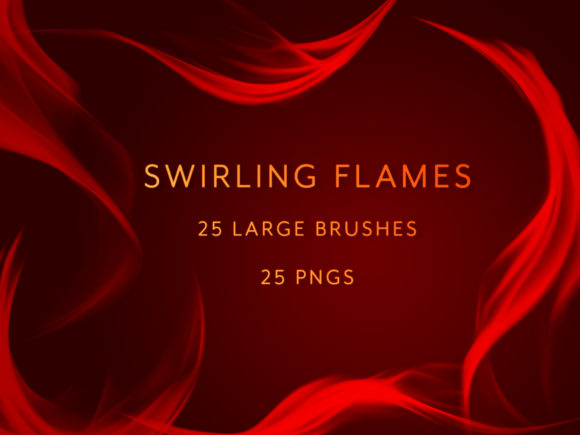
The core of this product is a digital download comprising two distinct file types: 25 custom Photoshop brushes (`.abr` format) and 25 corresponding high-resolution PNG images. The primary function of the Swirling Flames Photoshop Brushes is to replicate the organic, fluid motion of fire. Unlike standard hard-edged brushes, these are engineered to produce soft, swirling patterns that mimic the natural turbulence of flames.
Technically, the collection emphasizes scalability. The brushes and PNGs are created at a large size and high resolution. This is a crucial specification for professional work, as it allows the user to scale the elements up or down significantly without encountering pixelation or loss of detail. Whether applied to a small web icon or a large-format print poster, the integrity of the flame texture remains intact. The inclusion of both brush files and standalone images provides flexibility, catering to different workflows and software capabilities.
Reasons for Interest and Practical Benefits
There are several compelling reasons why a designer might seek out a dedicated fire brush set rather than creating these effects manually. The most significant benefit is time efficiency. Painting realistic fire requires a nuanced understanding of light, color temperature, and fluid dynamics. Even for skilled artists, rendering complex swirling flames can take hours. A pre-made brush set reduces this task to a few strokes, allowing the creator to focus on composition and lighting integration rather than texture generation.
Furthermore, the dual-format delivery (brushes and PNGs) addresses common compatibility and preference issues. The PNG files are particularly valuable for users who do not wish to install new brushes into their software or for those working in applications that do not support Photoshop brush formats. Since these PNGs feature no background, they function as immediate "drag-and-drop" elements. This makes them ideal for quick compositing tasks where speed is prioritized over custom stroke variation.
The variety within the set is another key consideration. With 25 unique variations, the collection offers a range of flame shapes and densities. This prevents the repetitive look that often plagues projects using a single brush tip. The ability to switch between different swirl patterns helps maintain visual interest and realism in larger pieces.
Tradeoffs and Technical Considerations
While the Swirling Flames Photoshop Brushes offer clear advantages, there are tradeoffs to consider before purchasing. The primary limitation of any preset brush set is the potential for a "generic" appearance if used without modification. Because these assets are available to the public, there is a risk that other designers may use the same strokes in their work. To mitigate this, users must treat the brushes as a base layer rather than a final solution. Effective use typically involves adjusting opacity, flow, color dynamics, and blending modes within Photoshop to integrate the flames seamlessly into the specific lighting environment of the artwork.
Additionally, while the high resolution allows for scaling, users must understand the limitations of raster-based effects. If a project requires infinite scalability (such as large-scale signage viewed from very close distances), vector-based solutions might theoretically be superior, though they often lack the organic noise and texture that raster brushes provide. However, for the vast majority of digital media, print, and screen-based projects, the resolution provided in this set is more than sufficient.
Another consideration is the learning curve associated with brush settings. Simply selecting the brush may not yield the desired result immediately. Users need to be comfortable with the Brush Settings panel in Photoshop to adjust spacing, scatter, and shape dynamics to make the flames look natural. Those unfamiliar with these controls may find the PNGs easier to utilize initially, as they require no configuration.
Ideal Use Cases
This collection is a strong fit for several specific scenarios. It is particularly well-suited for photo manipulation, where adding realistic fire elements to existing photographs is a common requirement. The soft edges of the swirling flames blend well with photographic textures when appropriate blending modes (such as Screen or Linear Dodge) are applied.
It is also highly effective for concept art and matte painting. Artists creating fantasy landscapes, character designs involving elemental powers, or apocalyptic scenes can use these brushes to quickly block in fire effects during the early stages of a painting. The high resolution ensures that these blocking layers can be refined and detailed later without degrading image quality.
Moreover, the set is useful for graphic design projects such as event posters, album covers, or promotional materials where fiery typography or accents are needed. The ability to drag and drop the PNGs allows designers to rapidly iterate on layout ideas without getting bogged down in technical execution.
When to Consider Alternatives
Despite their utility, there are situations where alternatives may be worth considering. If a project demands a highly stylized, non-realistic interpretation of fire—such as a flat vector illustration or a pixel-art game asset—these realistic swirling brushes may not be the appropriate tool. In such cases, hand-drawn vectors or custom pixel sets would provide better stylistic cohesion.
Additionally, if a user requires absolute control over every particle of the flame for a cinematic visual effects shot, dedicated 3D simulation software or advanced particle systems might be necessary. While these brushes are high quality, they are ultimately static 2D stamps or strokes. They cannot simulate the complex physics of a roaring inferno in a dynamic video sequence as effectively as 3D tools, although they can serve as excellent overlays for static frames within a video edit.
Making the Decision
Deciding whether to integrate the Swirling Flames Photoshop Brushes into your toolkit depends largely on your workflow priorities. If your goal is to enhance productivity while maintaining a high standard of visual realism, this set offers a balanced solution. The inclusion of both brushes and PNGs ensures that you have options regardless of your preferred method of asset integration.
For beginners, the PNGs offer a low-barrier entry point to adding fire effects, while advanced users can leverage the brushes for complex, layered compositions. The key to success lies in viewing these assets as foundational elements. By combining them with careful color grading, masking, and blending techniques, you can create unique imagery that transcends the limitations of a preset tool. Ultimately, if your projects frequently involve elemental effects, fantasy themes, or dramatic lighting, this collection represents a pragmatic investment that bridges the gap between manual painting and automated generation.