Enhancing Digital Workflows with 30 Tech Photoshop Stamp Brushes
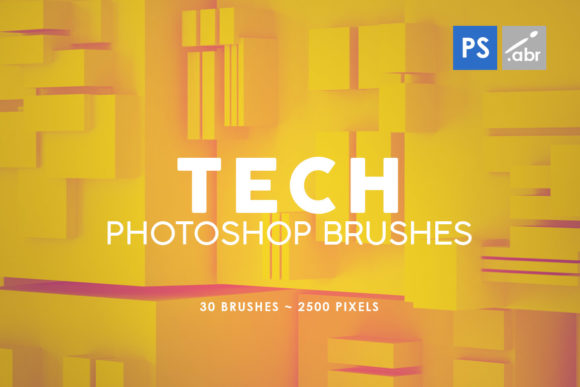
In the rapidly evolving landscape of digital design, the difference between a functional layout and a compelling visual narrative often lies in the texture and detail applied to the composition. Designers, photographers, and digital artists constantly seek assets that can bridge the gap between sterile digital perfection and organic, gritty realism. The 30 Tech Photoshop Stamp Brushes collection represents a focused utility designed to address this specific need. Compatible with a wide range of software versions from CS2 through the current Creative Cloud releases, this set offers a streamlined approach to adding technological depth to projects without the overhead of managing massive library files.
At its core, this asset pack consists of thirty distinct stamp brushes, each rendered at a high resolution of 2500 pixels. This specification is critical for modern workflows where output requirements can range from web graphics to large-format print. Unlike lower-resolution alternatives that may pixelate when scaled or applied to high-DPI canvases, these brushes maintain their integrity, allowing for flexible usage across various project scales. The term "stamp" in this context indicates that these are pre-rendered shapes rather than dynamic, pressure-sensitive strokes. This distinction is vital for users who need precise placement of complex graphical elements, such as circuit board patterns, data readouts, or mechanical overlays, without worrying about brush dynamics settings.
Technical Specifications and Compatibility
One of the most practical aspects of the 30 Tech Photoshop Stamp Brushes is their broad compatibility. By supporting versions from CS2 to the latest CC iterations, the creator ensures that freelancers working on older legacy systems and agencies utilizing the newest cloud-based tools can both integrate these assets seamlessly. This longevity is a significant value proposition in an industry where software updates can sometimes render older plugins or brush sets obsolete.
The file size of 2500 pixels per brush provides a substantial canvas for manipulation. In professional practice, this means a designer can apply a brush to a small icon or stretch it across a full-width banner while retaining crisp edges and internal details. High-resolution stamps are particularly useful for digital photo manipulation, where blending modes like Overlay, Soft Light, or Multiply are used to fuse technical elements with photographic backgrounds. If the source image of the brush were low resolution, these blending operations would reveal artifacts, breaking the illusion of realism. These brushes avoid that pitfall, offering clean, sharp definitions suitable for high-end retouching.
Practical Applications in Professional Workflows
The versatility of this collection allows it to serve multiple disciplines within the creative industry. For visual effects artists working on game assets or concept art, these brushes provide immediate access to sci-fi and industrial aesthetics. Instead of painting intricate mechanical details from scratch—a time-consuming process that requires specific technical knowledge—an artist can stamp these elements onto a surface and mask them to fit the geometry of a character's armor or a vehicle's hull. This accelerates the iteration process, allowing for rapid prototyping of designs.
For marketers and content creators, the application is equally valuable but often leans towards graphic design and social media visuals. In an era where technology-themed imagery dominates sectors like fintech, cybersecurity, and SaaS, having ready-made textures can elevate a standard stock photo into a branded asset. A marketer might take a generic image of a server room or a laptop and overlay these tech stamps to create a custom header for a blog post or an advertisement. The ability to use them as photo overlays means they can add a layer of sophistication and thematic relevance that plain color gradients or simple filters cannot achieve.
Educators and publishers creating materials for STEM subjects can also benefit from these tools. When illustrating concepts related to engineering, computing, or future technologies, these brushes can serve as decorative elements that make diagrams and slides more engaging. They help visualize abstract data or mechanical processes, making the content more accessible to students and readers.
Evaluating Quality and Usability
When evaluating any digital asset, consistency is key. A set of thirty brushes needs to feel cohesive; otherwise, the final composition can look disjointed. The TECH TEXTURE PHOTOSHOP STAMP BRUSHES appear to maintain a consistent aesthetic language, focusing on geometric precision and industrial motifs. This consistency ensures that when multiple brushes are combined in a single piece, they look like they belong to the same universe. This is crucial for maintaining brand identity or artistic style.
Usability extends beyond just the visual quality of the stamp; it involves how easily the user can manipulate the asset. Since these are stamps, the workflow is straightforward: select the brush, click to place, and then transform (scale, rotate, warp) as needed. This simplicity reduces the cognitive load on the designer, allowing them to focus on composition rather than tool configuration. Furthermore, because they are high-resolution images, they respond well to transformation tools. Users can distort them to match perspective lines in a photograph or rotate them to align with existing structural elements in an illustration.
However, it is important to acknowledge the limitations inherent to stamp brushes. Because they are static images, they lack the variability of a natural media brush. A single click produces the exact same shape every time. To avoid a repetitive, "stamped" look in a final piece, experienced users will vary the opacity, rotation, and scale of each application. They may also combine multiple stamps or use layer masks to erode parts of the image, integrating it more naturally into the background. Understanding this limitation is part of using the tool effectively; it is not a magic bullet but a component in a larger toolkit.
Who Benefits Most from This Collection?
This specific set of brushes is ideally suited for professionals who need to inject a technological vibe into their work quickly. Small business owners managing their own branding might find this particularly helpful if they lack the budget to hire a dedicated illustrator for custom tech elements. Similarly, freelance graphic designers who often face tight deadlines will appreciate the time-saving nature of having thirty pre-made, high-quality options at their fingertips.
Hobbyists interested in digital art and photo editing can also derive significant value. For those learning Photoshop, experimenting with blend modes and layer structures using these high-res stamps can be an excellent educational exercise. It allows them to see how professional-looking effects are constructed without needing advanced drawing skills. The 2500-pixel resolution ensures that even as they learn and make mistakes, the source material remains robust enough to salvage or repurpose.
For game developers working on UI elements or environmental textures, these brushes offer a quick way to generate placeholder assets or final HUD (Heads-Up Display) components. The tech-oriented nature of the stamps aligns well with genres like cyberpunk, space exploration, or modern military simulations. While they may not replace a dedicated texture artist for AAA titles, they are invaluable for indie developers or for rapid prototyping during the pre-production phase.
Long-Term Value and Integration
The true measure of a digital asset's worth is its longevity in a user's library. Many brush sets are downloaded, used once for a specific trend, and then forgotten. However, the fundamental nature of "tech" aesthetics—circuits, grids, data streams—is evergreen in the digital age. As long as technology remains a central theme in business and culture, these brushes will remain relevant. The compatibility with older Photoshop versions further cements this long-term value, ensuring that the investment (whether financial or time-based) does not expire with a software update.
Integrating the 30 Tech Photoshop Stamp Brushes into a workflow is generally seamless. They function as standard Photoshop brushes, meaning no special plugins or external panels are required. This reduces friction and potential points of failure in a complex production pipeline. For teams collaborating on projects, sharing a standard set of assets like this ensures visual consistency across different files and designers.
In conclusion, while this collection may not reinvent the wheel of digital texturing, it executes its specific purpose with competence and reliability. The combination of high resolution, broad software support, and a focused thematic direction makes it a practical addition to a designer's arsenal. It solves a common problem—how to add credible technological detail quickly—without introducing unnecessary complexity. For professionals and enthusiasts alike who regularly navigate the intersection of art and technology, these brushes offer a dependable resource for enhancing visual communication.