Enhancing Digital Art with 30 Old Paper Photoshop Stamp Brushes Vol. 1
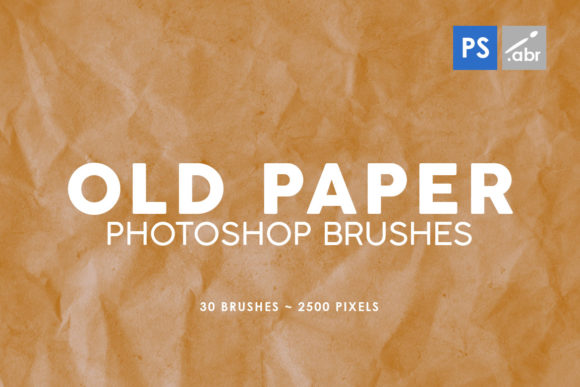
In the realm of digital design, achieving a sense of history and tactile realism often requires more than just standard filters or gradients. While modern software offers limitless clean lines and perfect vectors, there is a persistent demand for textures that evoke the imperfections of physical media. This is where specialized assets like 30 Old Paper Photoshop Stamp Brushes 1 become essential tools for creators seeking depth and character in their work. Designed for compatibility across a wide range of Adobe Photoshop versions—from CS2 through the latest CC releases—this collection offers a practical solution for adding authentic aged effects to digital compositions.
The core value of this brush set lies in its specificity and resolution. Comprising 30 distinct stamp brushes, each rendered at a substantial 2500 pixels in size, these assets are engineered to maintain clarity even when applied to high-resolution canvases. Unlike low-resolution texture overlays that can appear pixelated or muddy when scaled, these high-definition stamps allow for precise placement without sacrificing detail. For professionals working on large-format prints or detailed digital illustrations, this level of fidelity is not merely a luxury; it is a necessity for maintaining professional standards.
The Practical Utility of High-Resolution Stamps
When evaluating digital assets, one must consider how they integrate into an existing workflow. The 30 Old Paper Photoshop Stamp Brushes 1 package is structured as a "stamp" set, which distinguishes it from standard pattern brushes. Stamp brushes are ideal for placing specific, static elements onto a canvas rather than painting continuous strokes. This makes them particularly effective for layering textures over photographs, creating background distressing, or adding focal points of wear and tear to graphic designs.
The versatility of these brushes extends across multiple disciplines. For photo manipulators, they serve as excellent overlay tools. By adjusting blending modes such as Multiply, Overlay, or Soft Light, a designer can seamlessly fuse the paper texture with an underlying image, making a modern photograph appear as though it were printed on vintage stock. This technique is frequently employed in advertising campaigns that aim to evoke nostalgia or in editorial layouts requiring a historical aesthetic.
Furthermore, game developers and concept artists find significant value in these assets. When creating environment textures or user interface elements for games with a retro or steampunk theme, having access to ready-made, high-quality paper grunge can drastically reduce production time. Instead of scanning physical paper and cleaning up the images manually—a process that can take hours—artists can apply these stamps instantly and focus on refining the overall composition. The consistency in quality across the 30 variations ensures that the visual language of the project remains cohesive.
Quality and Usability Across Versions
A notable strength of this collection is its broad compatibility. The fact that these brushes function reliably from Photoshop CS2 to current CC versions addresses a common pain point for freelancers and small business owners who may not always have access to the latest software subscriptions. In a professional environment, file sharing between collaborators using different versions of Photoshop can often lead to broken assets or missing features. A toolset that bridges this gap ensures that the creative process remains uninterrupted, regardless of the technical setup.
The resolution of 2500 pixels is a critical factor in assessing the long-term value of these brushes. Many free or low-cost brush sets available online are often limited to 1000 pixels or less, which restricts their use to web graphics or small social media posts. When a client requests a billboard design or a high-DPI print layout, those lower-resolution assets fail to perform. The 30 Old Paper Photoshop Stamp Brushes 1 set eliminates this limitation, providing the flexibility to scale down for web use or utilize at near-full size for print applications without encountering jagged edges or loss of texture definition.
Strategic Applications for Marketers and Content Creators
For marketers and bloggers, visual differentiation is key to capturing audience attention in a saturated digital landscape. The use of textured elements can make social media graphics, eBook covers, and website banners feel more organic and less "computer-generated." Applying these old paper stamps can soften the harshness of digital typography, creating a welcoming and approachable brand identity. This is particularly effective for businesses in the education, publishing, or artisanal sectors, where a handcrafted or historical vibe aligns with brand values.
Educators and publishers can also leverage these brushes to create engaging learning materials. Worksheets, presentation slides, and digital textbooks often benefit from visual cues that mimic traditional paper, helping to reduce screen fatigue and improve readability. By incorporating subtle paper grain and edge wear using these stamps, educational content can feel more tangible and less ephemeral, potentially increasing student engagement.
Realistic Limitations and Best Practices
While the 30 Old Paper Photoshop Stamp Brushes 1 collection offers robust functionality, it is important to approach its usage with a strategic mindset. As stamp brushes, they are not designed for painting fluid, variable strokes like a watercolor or ink brush would. Users expecting dynamic pressure sensitivity in every application may need to adjust their expectations or combine these stamps with other brush types for a complete textural toolkit. The strength of this set is in its curated selection of static textures, not in its ability to simulate wet media dynamics.
Additionally, effective use requires an understanding of layer management. Simply stamping a texture onto an image at 100% opacity can sometimes look artificial. To achieve a natural result, users should experiment with opacity levels, layer masks, and blending modes. For instance, using a layer mask to fade the edges of a paper stain can make it appear as though the wear is inherent to the object rather than pasted on top. This level of refinement separates amateur edits from professional-grade design work.
Another consideration is color adaptation. Since these are grayscale or sepia-toned texture maps, they are inherently flexible. However, integrating them into full-color projects may require hue/saturation adjustments or color overlays to ensure the paper tone matches the lighting and color temperature of the base image. Ignoring this step can result in a disjointed look where the texture feels disconnected from the scene.
Final Assessment of Value and Fit
Ultimately, the decision to incorporate 30 Old Paper Photoshop Stamp Brushes 1 into a creative library depends on the specific needs of the user's projects. For those who frequently engage in photo manipulation, vintage-themed design, or texture-heavy artwork, this set represents a highly efficient resource. The time saved by avoiding manual texture creation allows creators to focus on higher-level conceptual tasks. The high resolution ensures that the investment remains relevant even as display technologies and print standards evolve.
For hobbyists and serious enthusiasts, this collection provides an accessible entry point into advanced texturing techniques without the steep learning curve of creating custom brushes from scratch. The immediate usability across various Photoshop versions removes technical barriers, allowing users to start experimenting immediately. Whether used to add a subtle grain to a portrait or to construct a complex, layered collage, these brushes offer a reliable foundation for adding depth and narrative to digital visuals.
In a market flooded with generic assets, the specificity and technical quality of this volume stand out. It serves not just as a collection of images, but as a functional utility that enhances the storytelling capability of digital art. By providing a bridge between the clean precision of digital tools and the chaotic beauty of physical decay, these brushes empower creators to produce work that resonates on a more human, tactile level.