Unlocking Digital Artistry: A Complete Guide to High-Resolution Gouache Stamp Brushes
In the ever-evolving landscape of digital design, the line between traditional artistry and modern technology continues to blur. For years, digital artists struggled with the "too perfect" look of computer-generated imagery. Lines were too straight, colors too uniform, and textures often felt sterile. This is where the integration of traditional media simulation becomes not just a stylistic choice, but a necessity for creating emotionally resonant work. Among the most powerful tools for bridging this gap are high-resolution texture brushes, specifically those modeled after gouache paint.
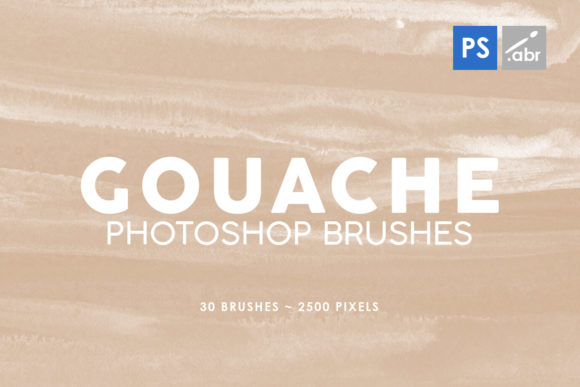
Today, we will explore the significance of specialized toolsets like the 30 Gouache Photoshop Stamp Brushes Vol. 2. Whether you are a seasoned graphic designer, a hobbyist photographer, or a game developer, understanding how to leverage these 2500-pixel high-resolution assets can transform your workflow from mundane to magnificent.
What Exactly Are Gouache Stamp Brushes?
To understand the value of these brushes, one must first understand the medium they emulate. Gouache is a type of water-based paint similar to watercolor but with a higher pigment concentration and an added inert white pigment (like chalk). This gives it a distinctive matte, opaque finish that feels velvety and rich. Unlike transparent watercolors, gouache sits on top of the paper, allowing for vibrant layering.
In the digital realm, a stamp brush functions differently than a standard flow brush. Instead of simulating the continuous flow of paint as you drag your cursor, a stamp brush deposits a pre-rendered image of a paint stroke or texture onto your canvas every time you click. The Vol. 2 Gouache Paint Texture Photoshop Stamp Brushes package contains 30 unique variations of these strokes. Because they are built from high-resolution images (2500 pixels in size), they retain incredible detail regardless of how much you scale them down or manipulate them within your project.
The Technical Advantage of High Resolution
You might wonder why the resolution matters so much. In digital imaging, resolution dictates clarity. Many free or low-quality brush packs suffer from pixelation when used in large formats. However, with brushes sized at 2500 pixels, you are working with print-ready quality. This means you can use these textures for massive billboards, high-definition game assets, or detailed book covers without losing the organic grit that makes them look authentic.
Furthermore, compatibility is key. These brushes are engineered to work seamlessly across a vast spectrum of Adobe Photoshop versions, ranging from the legacy CS2 all the way to the current Creative Cloud (CC) releases. This ensures that whether you are working on an older workstation or the latest MacBook Pro, your toolkit remains consistent and reliable.
Practical Applications in Modern Creativity
The versatility of these gouache stamps extends far beyond simple painting. They are multifaceted tools designed to solve specific visual problems in various industries. Let's break down how professionals utilize them in real-world scenarios.
1. Digital Photo Manipulation and Overlays
One of the most popular uses for this collection is photo overlaying. Photographers often find their images looking too "digital" or clean. By applying a gouache stamp brush over a photograph with a blending mode (such as "Multiply" or "Overlay"), you can introduce a tactile, hand-painted feel.
- Portraiture: Add subtle texture to skin tones or backgrounds to create a painterly portrait style.
- Landscapes: Use the opaque nature of the gouache simulation to blend sky elements or add atmospheric depth.
- Vintage Effects: Combine these brushes with grain filters to replicate the look of mid-century editorial illustrations.
2. Visual Effects for Game Development
In the gaming industry, particularly for 2D games or user interface (UI) design, texture is everything. Flat colors can make a game feel cheap. Developers use these 30 brushes to create environmental assets. Imagine a fantasy RPG where the spell effects aren't just glowing circles, but bursts of textured, opaque paint that feel magical and organic. The high resolution ensures that when these assets are viewed on 4K monitors, the texture of the "paint" remains crisp and inviting.
3. Decorative Elements in Graphic Design
For branding and marketing materials, standing out is crucial. These brushes serve as excellent decorative elements. You can use them to create custom borders, background patterns for packaging, or unique typographic masks. Because gouache is opaque, it works exceptionally well on dark backgrounds where traditional watercolor brushes might disappear. This allows designers to create bold, eye-catching compositions that demand attention.
How to Integrate These Brushes into Your Workflow
Adopting new tools can sometimes feel daunting, but integrating these stamp brushes is straightforward. Here is a step-by-step approach to getting the most out of the Vol. 2 collection:
- Installation: Download the brush file and load it into Photoshop via the Brush Preset Manager. Since they support CS2 through CC, the process is standardized across versions.
- Experiment with Blending Modes: Don't just paint in normal mode. Try Screen for lightening effects, Multiply for shadows, or Hard Light for intense contrast. The high-resolution data interacts beautifully with these modes.
- Layering Techniques: Because these are stamp brushes, build up your image slowly. Click once for a distinct mark, or click repeatedly in overlapping patterns to create dense, rich textures that mimic heavy application of physical paint.
- Color Dynamics: While the brushes come with inherent texture, enable "Color Dynamics" in your brush settings to allow the hue and saturation to shift slightly with each stamp, adding even more natural variation.
Common Misunderstandings About Texture Brushes
A common assumption among beginners is that texture brushes are only for "artists" who want to paint landscapes. This is a limiting view. In reality, these tools are essential for problem-solving. For instance, if a client complains that a vector logo looks too cold, a subtle gouache texture applied behind the logo can warm up the entire presentation. Another misconception is that high-resolution brushes will slow down your computer. Modern processors handle 2500-pixel stamps effortlessly, meaning you gain quality without sacrificing performance.
The Broader Impact on Digital Education and Business
Beyond the immediate aesthetic benefits, utilizing tools like the 30 Gouache Photoshop Stamp Brushes has educational and business implications. For students learning digital art, these brushes provide a shortcut to understanding light, shadow, and composition without needing to master the complex physics of traditional paint immediately. It allows them to focus on design principles while still achieving professional results.
For businesses, the ability to produce unique, textured content in-house reduces reliance on stock photography, which can often look generic. By creating custom overlays and effects, brands develop a unique visual language that is harder for competitors to replicate. In an era where content is king, authenticity is the currency that matters most.
Conclusion: Elevating Your Creative Potential
The Vol. 2 - Gouache Paint Texture Photoshop Stamp Brushes represent more than just a downloadable file; they are a bridge between the tactile warmth of traditional art and the limitless possibilities of digital technology. With 30 distinct brushes, 2500-pixel resolution, and broad software compatibility, this collection offers a robust solution for photographers, designers, and developers alike.
Whether you are looking to add a decorative flourish to a website, create immersive visual effects for a game, or simply give your photos a soulful, hand-crafted finish, these tools provide the necessary foundation. By understanding how to apply these textures effectively, you move beyond simple editing and step into the realm of true digital artistry. Embrace the texture, experiment with the opacity, and let the matte richness of digital gouache redefine your creative output.