Transforming Urban Sketches with the 38 Procreate Architecture Brushes Pack
Digital illustration has revolutionized how architects, urban planners, and concept artists visualize the built environment. Gone are the days when a quick site analysis or a conceptual cityscape required a physical sketchbook, heavy markers, and a dedicated desk space. Today, the entire workflow fits into the sleek profile of an iPad Pro, powered by the intuitive interface of Procreate. However, the software is only as good as the tools you feed it. This is where a specialized toolset becomes indispensable. The 38 Procreate Architecture Brushes pack offers a curated collection designed specifically to bridge the gap between technical precision and artistic expression, allowing creators to draft, render, and stylize structures with unprecedented speed.
When working on architectural visualization, generic brushes often fall short. A standard round brush might handle basic outlining, but it lacks the texture needed for concrete, the sharpness required for glass facades, or the organic irregularity of hand-drawn hatching. This specific brush set addresses those nuances head-on. Comprising 38 distinct brushes, the pack covers a wide spectrum of needs, from foundational line work to complex texturing and atmospheric effects. Whether you are a student presenting a final thesis project or a professional architect sketching ideas during a client meeting, having the right digital assets can drastically reduce rendering time while enhancing the visual impact of your work.
Precision Meets Artistic Flair in Cityscapes
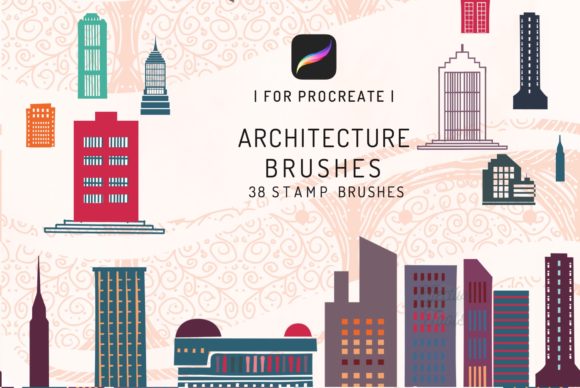
One of the most compelling features of this collection is its ability to generate convincing cityscapes and city silhouettes with minimal effort. Creating a believable skyline traditionally involves hours of layering shapes, adjusting perspectives, and manually adding details like windows, balconies, and rooflines. With the building stamps included in this set, users can populate a horizon line in seconds. These stamps are not just static images; they are dynamic brush tips that respond to pressure and tilt, allowing for variation in scale and opacity that mimics natural depth perception.
Imagine needing to block out a background for a presentation board. Instead of drawing every skyscraper individually, you can utilize the stamp brushes to lay down the massing of a dense urban core. The variety within the 38 Procreate Architecture Brushes ensures that no two buildings look exactly alike, preventing that repetitive, "copy-paste" aesthetic that often plagues digital art. Furthermore, the inclusion of silhouette-specific tools allows artists to create dramatic foregrounds against sunset gradients or moody night skies, adding narrative weight to otherwise technical drawings.
Beyond Architecture: Unexpected Applications in Tattoo Design
While the primary focus of this pack is clearly architectural, its utility extends into surprising creative territories, most notably tattoo motifs. The world of tattoo design often draws heavily from geometric patterns, structural lines, and illustrative styles that mirror architectural drafting. The clean lines, cross-hatching textures, and stippling effects found in this brush set are perfect for creating dot-work sleeves, geometric animal portraits, or surrealistic pieces that blend organic forms with rigid structures.
Tattoo artists who use iPads to draft stencils will find the precision of these brushes invaluable. The ability to toggle between a rough sketching brush and a fine-liner that mimics ink flow allows for a seamless transition from concept to final stencil. The architectural elements, such as brick textures or window grids, can be incorporated into larger pieces to add depth and context, turning a simple portrait into a scene. This cross-disciplinary versatility makes the 38 Procreate Architecture Brushes a smart investment for any illustrator, regardless of their primary niche.
Optimized Workflow for the iPad Pro Ecosystem
It is crucial to note that these tools are engineered specifically for the iOS app Procreate 4 and higher, optimized for use with the iPad Pro. The developers have leveraged the full capabilities of Apple's hardware and software integration. This means the brushes utilize advanced features like streamline stabilization for smooth curves, dual-texture blending for realistic material representation, and dynamic shape properties that react to the Apple Pencil's tilt and pressure sensors.
Attempting to force these assets into other ecosystems, such as desktop-based software, will result in incompatibility. These brushes DO NOT WORK IN PHOTOSHOP or other applications outside the Procreate environment. This limitation is actually a strength; by focusing exclusively on Procreate, the brush engine can be tuned to perform flawlessly without the bloat of cross-platform coding. For the iPad user, this translates to zero lag, instant response, and a fluid drawing experience that feels as natural as pen on paper. The optimization ensures that even complex strokes with multiple texture layers render instantly, keeping the creative flow uninterrupted.
What's Inside the Package?
Upon purchasing and downloading this asset pack, users receive more than just a list of brush files. The package is structured to ensure immediate usability and long-term value:
- Instruction Guidebook: A comprehensive manual that walks users through installation, best practices for layer management, and tips on combining different brushes to achieve specific material effects like wood, steel, or glass.
- The Brushset: The core of the package, consisting of 38 meticulously crafted brushes. This includes liners, wash brushes, texture scrappers, foliage makers, and the aforementioned building stamps.
- Instant Download: There is no waiting for physical shipping. Once the transaction is complete, the files are available immediately, allowing you to start your next project within minutes.
The guidebook is particularly useful for those new to digital architecture sketching. It doesn't just list the brushes; it explains the why and how. For instance, it might suggest using a specific dry ink brush for initial massing, followed by a translucent watercolor wash for shadow studies, and finally, the detail stamps for fenestration. This educational component elevates the product from a simple file download to a mini-course in digital technique.
Practical Considerations for Modern Creatives
In the fast-paced industries of design and entertainment, efficiency is currency. Clients often demand rapid iterations; a concept that looked good in the morning might need to be completely reimagined by the afternoon. Digital tools facilitate this agility. With the 38 Procreate Architecture Brushes, changing the lighting condition of a building or swapping out the cladding texture is a matter of selecting a new brush and painting over the existing layer. There is no need to erase and redraw from scratch, nor is there a need to mix physical paints or wait for ink to dry.
Moreover, the portability of the iPad Pro combined with this specialized brush set empowers professionals to work from anywhere. Site visits become opportunities for immediate documentation. An architect standing on a construction site can pull out their tablet, select a perspective grid brush from the set, and overlay proposed designs onto a photo of the existing conditions in real-time. This capability enhances communication with clients and contractors, making abstract ideas tangible instantly.
However, users must remain mindful of the technical requirements. As mentioned, compatibility is strictly limited to Procreate on iOS. If your workflow relies heavily on Adobe Creative Cloud or desktop-based rendering engines like V-Ray or Lumion, these brushes serve best as a conceptual tool rather than a final production asset. They excel in the ideation and presentation phases but are not intended for generating CAD-ready outputs or photorealistic 3D renders. Understanding this distinction helps in positioning the tool correctly within a broader pipeline.
Elevating Your Digital Toolkit
The decision to adopt a new set of digital brushes often comes down to whether it solves a specific problem or opens a new creative avenue. The 38 Procreate Architecture Brushes pack does both. It solves the problem of time-consuming detailing by providing ready-made stamps and textures, and it opens avenues for stylistic exploration by offering unique mark-making tools that differ from the default library.
For students, this pack can be the difference between a cluttered, messy sketch and a polished portfolio piece. For professionals, it represents a streamlined approach to client communication. And for hobbyists interested in urban sketching or tattoo design, it provides a professional-grade foundation to build upon. The inclusion of city silhouette tools alone saves countless hours of manual drawing, while the texture brushes add a level of sophistication that elevates the overall quality of the artwork.
Ultimately, the value of this brush set lies in its specialization. General-purpose brushes are jack-of-all-trades but masters of none. By focusing intensely on the needs of architectural visualization—and surprisingly, tattoo artistry—this collection delivers performance and results that generic tools simply cannot match. As the digital art landscape continues to evolve, having a tailored toolkit like the 38 Procreate Architecture Brushes ensures that your workflow remains efficient, your sketches remain inspiring, and your creative vision remains unbounded by technical limitations.