Elevate Art with 32 Leaves and Branches Procreate Brushes
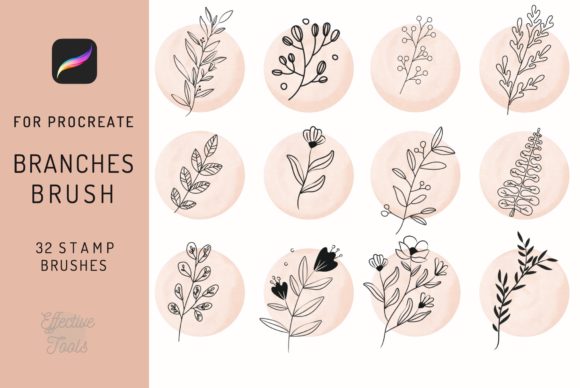
In the fast-paced world of digital illustration, finding tools that balance speed with authentic texture is often the difference between a good piece and a great one. For artists working on the iPad, the 32 Leaves and Branches Procreate Brushes set offers a specialized solution for those who need to incorporate organic elements without sacrificing the hand-drawn feel. This collection isn't just about stamping images onto a canvas; it is about providing a versatile toolkit for creating minimalist, hand-drawn line drafts that breathe life into botanical designs, tattoo motifs, and commercial branding projects.
Whether you are a professional illustrator, a tattoo artist sketching their next sleeve, or a hobbyist looking to embellish a digital planner, understanding the specific capabilities of this brush set can significantly streamline your workflow. The core value here lies in the specificity of the assets. Instead of spending hours drawing individual twigs or searching for generic clipart that lacks character, you have immediate access to thirty-two distinct variations of leaves, branches, and floral elements designed specifically for the iOS ecosystem.
The Power of Minimalist Hand-Drawn Lines
The aesthetic appeal of this collection centers on its minimalist, hand-drawn line draft style. In an era where hyper-realism often dominates digital art, there is a growing demand for simplicity and elegance. These brushes capture the imperfection and fluidity of ink on paper, which is crucial for creating designs that feel human rather than computer-generated. Each stroke within the 32 Leaves and Branches Procreate Brushes set retains the nuance of a real pen lift, making them ideal for projects that require a delicate touch.
For tattoo artists, this is particularly valuable. Tattoo design relies heavily on clean lines and balanced composition. When using these brushes as tattoo motifs, artists can quickly assemble complex botanical arrangements, testing how different leaves interact with stems and flowers before ever touching skin. The ability to tweak the size and rotation of each element within Procreate allows for rapid iteration, ensuring the final stencil is perfect. Similarly, graphic designers working on branding for organic products, tea companies, or wellness brands can use these elements to create logos and packaging that convey natural purity and artisanal quality.
Seamless Integration into Your Digital Workflow
One of the most critical aspects of adopting new digital tools is compatibility. It is important to note that these brushes are engineered exclusively for the iOS app Procreate 4 and higher, optimized for use with the iPad Pro. This specialization ensures that pressure sensitivity, tilt functions, and streamline features work exactly as intended, providing a smooth drawing experience that generic brushes often fail to deliver. However, users must be aware of the limitations: these brushes DO NOT WORK IN PHOTOSHOP or other desktop applications. They are native to the Apple Pencil and Procreate environment.
This exclusivity is actually a strength for iPad-centric creators. It means the brushes are fine-tuned to leverage the full potential of the hardware, resulting in sharper lines and more responsive performance. When you download the package, you aren't just getting a folder of images; you are getting a functional brush set that integrates directly into your Procreate library. The inclusion of an instruction guidebook further enhances usability, helping even novice users understand how to adjust settings like grain, shape dynamics, and opacity to customize the look of each leaf or branch to their specific project needs.
Versatile Applications Across Industries
The utility of the 32 Leaves and Branches Procreate Brushes extends far beyond simple illustration. Here is how different professionals can leverage this toolset:
- Tattoo Artists: Use the brushes to build custom flash sheets or client-specific designs. The variety of twigs and leaves allows for the creation of unique wreaths, borders, and filler elements that complement larger pieces.
- Wedding Invitations and Stationery Designers: Create elegant, botanical borders and corner accents for digital or print invitations. The hand-drawn style adds a personal, bespoke touch that mass-produced clipart cannot match.
- Social Media Managers and Bloggers: Enhance posts and stories with organic frames or decorative elements. Using consistent botanical themes can help establish a recognizable visual brand identity on platforms like Instagram and Pinterest.
- Educators and Content Creators: Develop engaging worksheets, presentation slides, or educational materials about nature and biology. The clear, distinct lines make these elements easy to see on screens and in print.
- Product Designers: Mockup packaging for cosmetics, food, or beverages where a natural aesthetic is key. Quickly visualize how a laurel wreath or a sprig of lavender would look on a label.
Maximizing Efficiency with Instant Download Assets
Time is a non-renewable resource for creatives. The instant download nature of this package means you can go from purchase to creation in minutes. There is no waiting for shipping or installation discs; the file is ready to import immediately. Once installed, the brushset consisting of 32 brushes sits ready in your favorites or a dedicated folder, allowing you to pull up a specific leaf shape instantly. This efficiency is vital when working under tight deadlines or when inspiration strikes unexpectedly.
Furthermore, because these are true brushes and not just static PNGs, they offer dynamic flexibility. You can change the color of a branch with a single tap, overlay multiple leaves to create density, or erase parts of a stem to make it look weathered. This level of control supports a more iterative creative process. Instead of committing to a single static image, you are painting with living elements that can be molded to fit the composition perfectly.
Practical Considerations for Selection and Use
When evaluating whether the 32 Leaves and Branches Procreate Brushes are right for your toolkit, consider your primary medium. If your workflow is strictly desktop-based using Adobe Photoshop or Illustrator, this set will not serve your needs due to platform restrictions. However, if you are part of the growing community of iPad artists, this set fills a specific niche that general-purpose brush packs often miss.
It is also worth considering the style consistency. Because all thirty-two brushes share a cohesive minimalist, hand-drawn aesthetic, they work harmoniously together. You won't find yourself struggling to match a photorealistic oak leaf with a cartoonish pine branch. This consistency is essential for maintaining a professional look across a portfolio or a large-scale project like a pattern design or a coloring book.
For those interested in commercial use, always review the specific license terms included in the instruction guidebook. Generally, assets like these are intended to be used as part of a larger design rather than sold as standalone clipart, but they are excellent for enhancing products you sell, such as prints, merchandise, or digital templates.
In conclusion, the 32 Leaves and Branches Procreate Brushes represent a focused, high-quality addition to any digital artist's arsenal. By combining the charm of traditional ink drawing with the convenience of modern technology, they empower creators to produce sophisticated botanical art, intricate tattoo designs, and elegant branding elements with unprecedented ease. Whether you are decorating a digital journal or designing a commercial logo, these brushes provide the organic touch needed to make your work stand out in a crowded digital landscape.