Mastering Digital Foliage: A Guide to .ABR Leaf Brushes
In the evolving landscape of digital art, the difference between a composition that feels flat and one that breathes with life often lies in the texture. For creators working in environments ranging from lush fantasy forests to delicate botanical illustrations, the ability to render foliage efficiently without sacrificing realism is a constant challenge. This is where specialized tools like .ABR Leaf Brushes become indispensable. These digital assets are designed to bridge the gap between manual painting and photographic realism, offering a streamlined workflow for professionals and hobbyists alike.
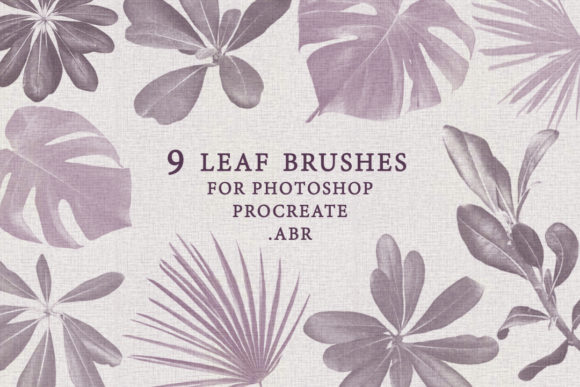
The core of this toolkit is a collection of 9 realistic leaf brushes, meticulously crafted to replicate the organic imperfections found in nature. Unlike standard round or square brushes that require the artist to paint every vein and edge by hand, these brushes come pre-loaded with the complex details of leaf structures. Whether you are using Adobe Photoshop on a desktop or Procreate on an iPad, the versatility of the .ABR format ensures that your creative process remains uninterrupted across different platforms.
The Anatomy of a Realistic Digital Leaf
Understanding what makes these brushes effective requires looking beyond the surface. A generic "leaf stamp" often looks repetitive and artificial when used multiple times. However, a high-quality set of .ABR Leaf Brushes incorporates dynamic properties such as size jitter, rotation control, and opacity variation. The included pack features nine distinct variations, each serving a specific purpose within a larger composition. Some brushes are optimized for broad, sweeping strokes to create the canopy of a tree, while others are fine-tuned for detailing individual leaves in the foreground.
The resolution of these brushes is a critical factor in their utility. With dimensions ranging from 1350 to 2014 pixels, these assets provide sufficient detail for high-resolution prints and large-scale digital displays. When you zoom in on a canvas, the edges of the leaves remain crisp, and the internal textures—such as veins and slight color gradations—retain their clarity. This high fidelity allows artists to work confidently, knowing that their artwork will hold up under scrutiny, whether it is viewed on a smartphone screen or printed on a large poster.
Seamless Integration Across Platforms
One of the most significant advantages of this specific collection is its cross-platform compatibility. In the past, artists often had to maintain separate libraries for different software, leading to disorganized workflows and inconsistent results. This .ABR ZIP folder simplifies that process entirely. The .ABR (Adobe Brush) format is the industry standard for Photoshop, but it is also fully supported by Procreate, the leading illustration app for iOS.
By installing this single file, users gain immediate access to all nine brushes in both environments. This means an artist can start a sketch on their tablet during a commute using Procreate and seamlessly transition to finishing the piece on a desktop workstation in Photoshop without needing to recreate assets or convert files. The installation process is straightforward: the ZIP folder contains the necessary .ABR file which, once imported, populates the brush library instantly. This efficiency is particularly valuable for business owners and content creators who need to produce high-quality visuals quickly.
Practical Applications for Diverse Creators
The utility of .ABR Leaf Brushes extends far beyond traditional landscape painting. While illustrators creating storybook scenes are obvious beneficiaries, a wide array of professionals can leverage these tools to enhance their projects. Consider the following real-world scenarios:
- Graphic Designers: Creating seasonal marketing materials, such as autumn sale flyers or spring product launches, often requires organic elements to soften rigid layouts. These brushes allow designers to frame text or add decorative borders with a natural feel.
- Concept Artists: In game development and film pre-production, speed is essential. Concept artists can block out dense forest environments in minutes rather than hours, focusing more on lighting and composition than on painting individual leaves.
- Photographers: Retouchers often use digital painting to composite images. Adding realistic foliage to a portrait background or enhancing a nature shot becomes significantly easier with textured brushes that blend naturally with photographic elements.
- Educational Content Creators: Those producing materials for biology or environmental science can use these brushes to create accurate, engaging diagrams of plant life without needing advanced drawing skills.
Evaluating Suitability for Your Projects
Before integrating any new tool into your workflow, it is important to assess how it fits your specific needs. While .ABR Leaf Brushes offer immense value, they are best utilized as part of a broader toolkit rather than a standalone solution. These brushes excel at adding texture and depth, but they should be combined with custom color palettes and layer blending modes to achieve the most authentic results. Relying solely on the default colors of a brush can lead to a monochromatic and unnatural look.
Furthermore, understanding the limitations is key to managing expectations. While the nine included variations offer a good range of shapes, no single brush set can cover every species of plant on Earth. Artists may need to rotate the canvas or adjust the brush angle manually to avoid visible repetition in large areas of foliage. The strength of this particular set lies in its realism; the edges are not perfectly smooth, mimicking the slight wear and tear found in real leaves. This characteristic is a strength for naturalistic art but might require adjustment if a stylized, cartoonish look is desired.
Maximizing Value Through Technique
To truly get the most out of these .ABR Leaf Brushes, creators should experiment with pressure sensitivity settings. Most modern tablets allow the brush size and opacity to react to how hard the stylus presses against the screen. By mapping these dynamics correctly, a single stroke can transition from a faint, distant leaf to a sharp, prominent one, creating an instant sense of depth. Additionally, utilizing layer masks in conjunction with these brushes allows for non-destructive editing, giving artists the freedom to erase or refine foliage placement without damaging the underlying artwork.
The inclusion of nine distinct brushes encourages experimentation. Users are invited to mix and match the different leaf shapes to simulate biodiversity within a single scene. Combining a broad-leaf brush with a narrower, pointed variety can mimic the complexity of a real-world undergrowth. This approach prevents the "stamped" look that plagues lower-quality digital art and fosters a more organic, hand-painted aesthetic.
Support and Community
Adopting new digital tools often comes with a learning curve, and having access to support can make a significant difference. For those who have purchased this collection, the creator, Svetlana, offers direct assistance. If you encounter issues with installation, have questions about optimizing the brushes for specific versions of Photoshop or Procreate, or simply want advice on how to achieve a certain effect, reaching out is encouraged. This level of personal support adds value to the product, ensuring that users are not left stranded if technical hurdles arise.
In conclusion, the journey to mastering digital nature scenes is made smoother with the right resources. The .ABR Leaf Brushes pack represents a thoughtful convergence of artistic insight and technical precision. By providing high-resolution, realistic, and versatile tools in a universally compatible format, it empowers creators to focus on what matters most: telling their visual stories. Whether you are a seasoned professional looking to speed up your workflow or an enthusiast eager to improve your digital gardening, these nine brushes offer a robust foundation for bringing the natural world to life on your screen.
Thank you for visiting the store and exploring the possibilities of digital foliage. Remember, the best tool is the one that disappears into your workflow, allowing your creativity to take center stage. With these brushes installed and ready, your next masterpiece is just a stroke away.