Unlock Shimmering Designs with 5 Metallic Mermaid Procreate Brushes
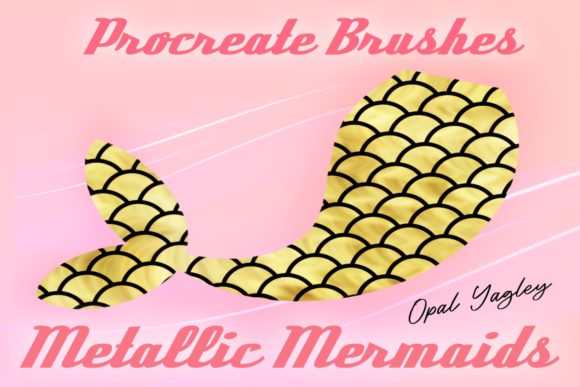
There is a specific kind of magic that happens when light hits water, creating that iridescent play of color we often associate with mermaids. For digital artists, capturing this "shiny metallic" effect can be surprisingly difficult using standard tools. This is where the 5 Metallic Mermaid Procreate Brushes pack comes into play. It isn't just about drawing a fish; it is about adding a layer of professional polish and texture to illustrations, logos, and designs that need to pop. Whether you are a freelance illustrator working on a book cover or a small business owner designing your own product packaging, these brushes offer a shortcut to achieving complex textures without spending hours rendering every single scale by hand.
Before you dive in, it is crucial to understand the ecosystem these tools live in. These brushes are designed exclusively for the Procreate app on iPad. You will need an iPad, iPad Pro, or a compatible tablet paired with an Apple Pencil or a pressure-sensitive stylus to get the most out of them. The pressure sensitivity is key; it allows the brush strokes to vary in opacity and size, mimicking the natural flow of water and the overlapping nature of scales. A common point of confusion for new buyers is compatibility: these files do not work in Photoshop, Clip Studio Paint, or other desktop applications. They are optimized specifically for the touch interface and rendering engine of Procreate. Once you download the file, typically labeled something like "OPY-Metallic Mermaids," you simply import it into your brush library, and you are ready to create.
Real-World Applications for Creators and Entrepreneurs
The utility of these metallic fish scales patterns extends far beyond drawing fantasy characters. While the name suggests a niche focus, the texture itself is incredibly versatile for various commercial and personal projects. Consider a blogger or content creator who needs eye-catching graphics for social media posts during the summer season. Using these brushes, they can quickly create background textures for Instagram stories or Pinterest pins that feature ocean themes, summer sales, or beach vacation guides. The metallic sheen catches the eye as users scroll through their feeds, increasing engagement rates compared to flat, solid-color backgrounds.
For entrepreneurs launching a line of beauty products, such as bath bombs, shampoos, or body glitters, packaging design is everything. Imagine designing a label for a "Sea Salt Scrub." Instead of hiring a graphic designer to create a custom pattern from scratch, you can use the 5 Metallic Mermaid Scales Brushes to generate a unique, seamless background. You can adjust the colors to match your brand palette—perhaps a soft rose gold for a luxury feel or a vibrant teal for a fun, youthful vibe. This ability to customize textures on the fly saves significant time and money, allowing small business owners to maintain a high-quality aesthetic without a large budget.
Educational and Editorial Uses
Educators and publishers also find immense value in these tools. When creating materials for biology lessons about marine life, standard clip art often looks generic or outdated. By using these brushes, an educator can create custom diagrams of fish anatomy or ocean ecosystems that look modern and engaging. The "shiny" aspect helps distinguish different layers of skin or types of scales in a way that black-and-white line drawings cannot. Similarly, authors self-publishing children's books about the ocean can use these brushes to illustrate characters or settings. The brushes allow for a consistent style throughout the book, ensuring that every creature has a cohesive, magical look that appeals to young readers.
In the world of wedding invitations and event planning, the "mermaid" theme is perennially popular. Freelance calligraphers and invitation designers can use these metallic brushes to add subtle accents to save-the-dates or menu cards. A border made of overlapping metallic scales can elevate a simple card into a keepsake. Because the brushes respond to pressure, the artist can control the density of the scales, making them faint and watermark-like for a sophisticated look, or bold and opaque for a statement piece.
Maximizing the Potential of Your Brush Set
To get the best results, it helps to understand how to layer these effects. The pack includes five distinct brushes, each likely offering a variation in scale size, shape, or metallic intensity. A practical approach is to start with a base layer of color, then use the largest scale brush to establish the general direction of the pattern. Follow up with a smaller, more detailed brush to add depth and highlight specific areas where light would naturally hit. This technique creates a three-dimensional effect that makes the artwork feel alive.
Color choice plays a massive role in how "metallic" the final result appears. In Procreate, utilizing the "Alpha Lock" feature allows you to paint directly onto your scale layer without going outside the lines. Try using gradient maps or overlay blending modes with bright neons or deep jewel tones to enhance the metallic property. For instance, painting a bright white or silver over a dark blue scale layer can simulate the reflection of sunlight on water. Experimentation is encouraged; try rotating your canvas while drawing to find the most natural wrist movement for creating long, flowing scale patterns.
Important Considerations Before Downloading
While the creative possibilities are endless, there are practical factors to consider before purchasing. First, ensure your hardware is up to the task. Older iPad models may struggle with complex brush engines that calculate metallic sheen and texture in real-time, potentially leading to lag. If you are using an older device, test your current brush load to see how your tablet handles heavy textures. Second, remember the learning curve. Even though these are "instant download" tools, mastering them takes practice. Watch a few tutorials on how to use textured brushes in Procreate to understand stroke stabilization and pressure curves.
It is also vital to respect the licensing terms included with your download. Most creators allow for commercial use of the artwork you create, meaning you can sell the images you make using these brushes. However, you typically cannot resell the brush files themselves or claim them as your own creation. Always read the included readme file or license agreement to avoid legal issues down the road. Finally, keep in mind that these are digital tools. The "metallic" look is simulated through color and opacity; it will not actually print as foil unless you use specific printing techniques like spot UV or foil stamping, which require separate file preparations.
Ultimately, the 5 Metallic Mermaid Procreate Brushes are more than just a novelty item; they are a functional asset for anyone looking to add texture and luminosity to their digital workflow. From enhancing a marketing campaign to illustrating a bedtime story, these tools bridge the gap between imagination and execution. By understanding your device requirements and experimenting with layering techniques, you can transform simple strokes into shimmering masterpieces that resonate with audiences across various platforms.