MAGERPAINT Procreate Brushes: A Digital Artist's Toolkit
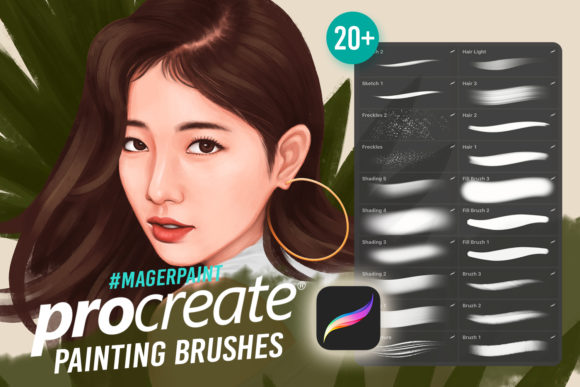
Digital illustration on the iPad has evolved from a novelty into a professional standard, yet many artists still find themselves bogged down by the technical setup of their tools. The difference between a frustrating session and a flow state often comes down to the reliability and versatility of your brush set. This is where MAGERPAINT Procreate Brushes steps in, offering a curated collection designed specifically to streamline the creative process for iOS users. Created by Nur Miftah, this pack consolidates twenty distinct tools into a single, cohesive library, addressing common pain points like texture inconsistency, time-consuming shading, and the struggle to create realistic organic details.
For professionals and hobbyists alike, the value of a specialized brush set lies not just in the variety it offers, but in how intuitively those tools integrate into an existing workflow. When you open Procreate and immediately have access to reliable sketching, shading, and texturing options, you remove the friction that often stalls creativity. The MAGERPAINT collection is built with this efficiency in mind, providing a "all-in-one" solution that covers the entire painting pipeline from initial concept to final render.
Streamlining the Creative Workflow
One of the most significant advantages of adopting a unified brush set like MAGERPAINT Procreate Brushes is the reduction of decision fatigue. In digital art, constantly switching between different downloaded packs to find the right texture or line weight can disrupt your mental focus. This collection solves that by grouping essential functions—sketching, freckles, shading, hair, and filling—into one accessible menu.
Consider the practical scenario of a character designer working on a tight deadline. Instead of hunting through five different folders to find a sketching brush, a specific skin texture tool, and a hair rendering stroke, everything is available instantly. The inclusion of dedicated Freckles and Hair Brushes means that adding life-like details to a portrait no longer requires complex layer masking or manual dotting. These specialized tools allow artists to achieve high-fidelity results with fewer strokes, effectively speeding up the production time without sacrificing quality.
The Fill Brush included in the set further exemplifies this focus on efficiency. While Procreate has native fill tools, a custom fill brush often provides better edge detection and texture retention, allowing for quicker blocking of colors in complex illustrations. For marketers and content creators who need to produce visual assets rapidly, this kind of time savings accumulates significantly over weeks and months of work.
Achieving Realistic Textures and Depth
Beyond speed, the primary draw of the MAGERPAINT collection is its ability to mimic traditional media behaviors within a digital environment. The Shading brushes are engineered to respond naturally to pressure and tilt, enabling smooth gradients and soft transitions that are often difficult to achieve with default settings. This is particularly beneficial for educators and publishers creating instructional materials or book covers, where visual clarity and depth are paramount.
The Freckles brush serves as a prime example of niche utility. Creating realistic skin textures manually can be tedious and often looks repetitive if not done carefully. A dedicated stamp or scatter brush for this purpose allows for random, natural distribution, enhancing the realism of character portraits instantly. Similarly, the Hair Brush is designed to lay down strands that follow the flow of movement, helping artists avoid the "clumped" look that plagues amateur digital paintings. By handling these micro-details efficiently, the artist can focus more on composition, lighting, and storytelling.
For freelancers and small business owners selling digital products or commissions, the quality of the final output directly impacts perceived value. Using a toolset that consistently delivers professional-grade textures helps maintain a high standard across all projects, reinforcing brand reputation and client trust.
Important Compatibility and Usage Notes
While the benefits of MAGERPAINT Procreate Brushes are substantial for iPad users, it is critical to understand the technical limitations to avoid frustration. These brushes are engineered exclusively for the iOS APP Procreate. They utilize specific code and rendering engines unique to Apple's ecosystem and the Procreate application.
These brushes DO NOT WORK IN PHOTOSHOP or other applications such as Clip Studio Paint, Krita, or Android-based drawing apps. Attempting to import them into unsupported software will result in errors or non-functional tools. This distinction is vital for professionals who work across multiple platforms. If your primary workflow relies on Adobe Photoshop on a desktop, this specific pack will not integrate into your system. However, for those who have transitioned to the iPad Pro or iPad Air as their primary creation device, this exclusivity ensures optimized performance and stability within the app.
Before purchasing or downloading, users should verify their device compatibility. Ensure you have the Procreate app installed and updated on your iPad. This set is ideal for illustrators, concept artists, and designers who have fully embraced the mobile-first creative workflow. It is less suitable for those who strictly operate in a desktop-centric environment without an iPad companion.
Who Benefits Most from This Collection?
The versatility of the twenty brushes included in the MAGERPAINT pack makes it relevant for a wide demographic, but certain groups will find exceptional value:
- Freelance Illustrators: Those needing to switch quickly between styles or complete commissions rapidly will appreciate the all-in-one nature of the kit.
- Content Creators and Bloggers: Individuals creating custom graphics for social media or articles can use the shading and fill tools to produce unique visuals that stand out from stock imagery.
- Educators and Workshop Leaders: Teachers demonstrating digital painting techniques can rely on the predictable behavior of these brushes to show students clear examples of texture and form.
- Hobbyists and Aspiring Artists: Beginners often struggle with setting up their digital canvas. Having a pre-configured set that handles complex tasks like hair and skin texture allows them to focus on learning fundamental art principles rather than troubleshooting software settings.
Making the Right Choice for Your Art
Investing in digital assets is about finding tools that align with your specific goals. MAGERPAINT Procreate Brushes by Nur Miftah represents a thoughtful consolidation of essential painting tools. It removes the guesswork from texturing and detailing, allowing the artist to concentrate on the narrative of their piece.
However, success with any tool depends on practice and understanding its constraints. While these brushes simplify the technical execution of freckles, hair, and shading, they do not replace the need for foundational art skills. They are enhancers, not replacements for artistic vision. Users should view this pack as a robust addition to their library that complements their existing skills, particularly if they are committed to the Procreate ecosystem.
In a market saturated with generic brush sets, the specificity of this collection—focusing on the exact needs of portrait and character work—makes it a practical choice. Whether you are refining a portfolio, launching a new product line, or simply enjoying the act of painting, having reliable, high-quality tools at your fingertips can transform the way you create. Just remember to keep your workflow within the iOS environment to fully enjoy the capabilities these brushes offer.