Elevating Digital Landscapes with 15 Procreate Clouds Brushes
In the realm of digital illustration, few elements are as challenging to master yet as critical to atmospheric depth as clouds. Whether you are composing a sweeping fantasy landscape, designing a moody background for a character portrait, or sketching motifs for tattoo flash sheets, the quality of your sky can make or break the composition. For iPad artists working within the Procreate ecosystem, the 15 Procreate Clouds Brushes pack offers a specialized solution designed to bypass the tedious process of painting cumulus and stratus formations from scratch. This brush set is not merely a collection of stamps; it is a workflow optimization tool tailored for professionals and serious hobbyists who value efficiency without sacrificing artistic integrity.
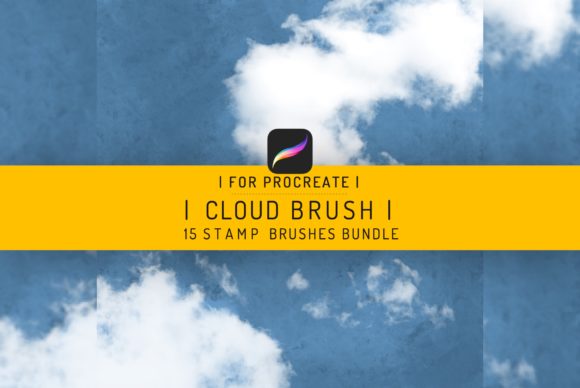
The primary value proposition of this bundle lies in its specificity. Unlike generic texture packs that offer a scattergun approach to assets, these fifteen brushes are curated specifically for cloud formation. They range from soft, diffused edges suitable for distant horizons to denser, more volumetric shapes that command attention in the foreground. For users operating on iPad Pro devices with Procreate version 4 or higher, the integration is seamless. The brushes leverage the app's native rendering engine to provide realistic opacity flow and pressure sensitivity, ensuring that each stroke feels responsive rather than static.
Technical Performance and Realistic Rendering
When evaluating digital assets, the distinction between a "stamp" and a "brush" often comes down to flexibility. A common pitfall with cloud brushes is that they appear too uniform, creating a repetitive pattern that breaks immersion. The 15 Procreate Clouds Brushes address this by incorporating variation in their shape dynamics. When used in a real-world workflow, these tools allow the artist to build up layers of atmosphere gradually. You can start with a light wash to establish the base tone of the sky and then layer heavier, more defined cloud forms to create depth and drama.
The realism achieved by this set stems from the careful calibration of grain and blur settings within the brush engine. In landscape painting, the transition between the sky and the land is often where amateur work becomes apparent. These brushes facilitate smoother blending, allowing for those soft, ethereal edges that mimic the scattering of light in the atmosphere. For tattoo artists, this level of control is equally vital. When adapting these designs for skin, the ability to adjust the density of the cloud form ensures that the motif translates well from the screen to the stencil, maintaining clarity even when scaled down.
It is important to note the technical constraints alongside the capabilities. These brushes are engineered exclusively for the iOS environment. They do not work in Photoshop or other desktop-based raster graphics editors. This limitation is a result of the proprietary file structure Procreate uses for its brush library. While this may seem restrictive for artists who switch between platforms, it ensures that the performance on the iPad is optimized. There is no lag, no compatibility error, and no need for complex installation scripts. The instant download nature of the package means that once purchased, the assets are ready for immediate deployment in your current project.
Workflow Efficiency for Professionals and Creators
For freelancers, marketers, and content creators, time is a tangible currency. The pressure to deliver high-quality visuals quickly often leads to the temptation of using low-resolution stock photos or generic clip art. Integrating the 15 Procreate Clouds Brushes into your toolkit allows for the creation of unique, copyright-safe assets in a fraction of the time it would take to paint them manually. Consider a blogger needing a custom header image for a post about weather patterns or a travel entrepreneur designing social media graphics. Instead of searching for the perfect photo, they can generate a bespoke sky that matches their brand's color palette exactly.
The included instruction guidebook further enhances the utility of the pack. Rather than leaving users to guess the optimal settings, the guide provides insights into layering techniques and blending modes that maximize the potential of each brush. This educational component adds long-term value, transforming the purchase from a simple asset acquisition into a mini-masterclass on atmospheric perspective. Educators and workshop leaders may find this particularly useful when teaching digital painting fundamentals, as it provides students with reliable tools to focus on composition rather than getting bogged down in texture creation.
Versatility Across Creative Disciplines
While the primary application of this brush set is landscape painting, its versatility extends into niche areas such as tattoo design and concept art. Tattoo motifs often rely on traditional imagery, and clouds are a staple in styles ranging from American Traditional to Neo-Traditional. The vector-like clarity of these brushes, when used at high resolution on an iPad Pro, provides clean lines and solid fills that are easy for tattoo artists to trace and adapt. The ability to manipulate the opacity allows for the creation of shading effects that mimic the dot-work or whip-shading techniques used in actual ink application.
Furthermore, small business owners who handle their own branding can utilize these tools to add a touch of professionalism to their visual identity. A consistent use of atmospheric elements across packaging, websites, and advertisements can create a cohesive brand narrative. The Cloud Stamps included in the set are particularly effective for adding subtle background textures to logos or product mockups, giving them a grounded, organic feel that flat colors often lack.
Practical Limitations and Considerations
Despite their strengths, it is crucial to approach this toolset with realistic expectations. These brushes are aids, not replacements for fundamental artistic skill. Over-reliance on any stamp-based brush can lead to artwork that feels disjointed or artificial if the lighting and perspective do not align with the rest of the piece. The user must still possess an understanding of light sources, color theory, and spatial relationships to integrate these clouds convincingly. Additionally, as mentioned, the exclusivity to Procreate means that if your workflow requires exporting editable layers to Photoshop for final retouching, you will need to rasterize these elements first, which limits future editability of the specific brush strokes.
The package content is straightforward: an instruction guidebook, the brush set consisting of 15 distinct tools, and the mechanism for instant download. There are no hidden fees or subscription requirements. However, users must ensure their device meets the minimum requirement of Procreate version 4. While most professional iPad users are likely on much newer versions, those holding onto older devices should verify compatibility before purchasing to avoid frustration.
Final Verdict on Utility and Value
In conclusion, the 15 Procreate Clouds Brushes represent a focused, high-utility addition to the digital artist's library. They strike a balance between ease of use and artistic control, making them suitable for a wide demographic ranging from seasoned illustrators to ambitious hobbyists. The realistic rendering capabilities address one of the most time-consuming aspects of landscape creation, while the specific design considerations for tattoo motifs broaden their appeal beyond standard digital painting.
For those invested in the Apple ecosystem, particularly iPad Pro users, this bundle eliminates the friction of creating atmospheric elements from scratch. It empowers creators to iterate faster, experiment with different moods, and produce polished work with greater consistency. While it does not replace the need for a strong foundational understanding of art principles, it serves as a powerful lever to amplify productivity and enhance the visual impact of digital compositions. If your goal is to streamline your workflow while maintaining a high standard of visual quality, this brush set offers a practical and effective solution.