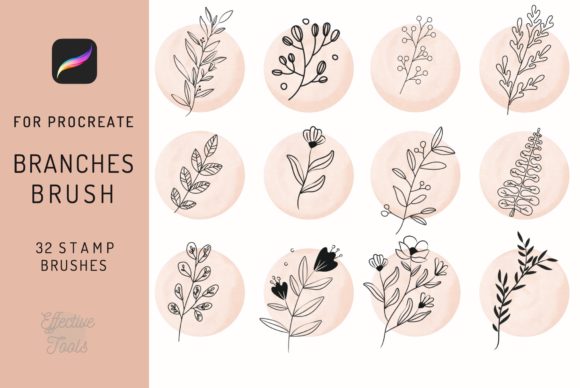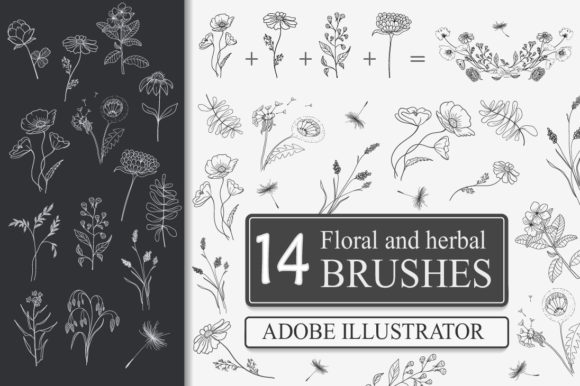
Elevate Art with Floral and Herbal Brushes
In the fast-paced world of digital design, efficiency often battles with creativity. You want your work to look organic, hand-drawn, and unique, but you rarely have the time to illustrate every single leaf or petal from scratch. This is where Floral and Herbal Brushes become an indispensable asset in your creative toolkit. Designed specifically for Adobe Illustrator, these flexible, adjustable tools bridge the gap between rigid vector geometry and the fluid beauty of nature. Whether you are a seasoned graphic designer, a small business owner creating your own branding, or a hobbyist looking to elevate your personal projects, understanding how to leverage these brushes can significantly transform your workflow and the quality of your output.
At their core, these brushes are not just static images; they are dynamic vector paths that respond to your input. Unlike raster stamps that pixelate when resized, Floral and Herbal Brushes retain crisp edges at any scale. The true power lies in their adjustability within Adobe Illustrator 14 and later versions, including the current CC suite. When you draw a path—whether it is a sweeping curve, a tight circle, or a jagged line—the brush adapts its shape to follow that trajectory. This means you are not limited to pre-set arrangements. Instead, you dictate the flow, density, and orientation of the flora, allowing you to create custom floral design elements that fit your specific composition perfectly.
Why Vector Flexibility Matters for Modern Designers
The distinction between using a standard image and a true vector art brush cannot be overstated. With Floral and Herbal Brushes, you gain complete control over the final appearance. Once applied, the artwork remains fully editable. You can reshape the path to alter the arrangement, resize the entire element without losing resolution, or even tweak individual anchor points to refine the look. This level of control is crucial for professional applications where client revisions are common. Imagine designing a wedding invitation suite where the client wants the floral border to be slightly more open on the RSVP card than on the main invite. With these brushes, that adjustment takes seconds rather than requiring a complete redraw.
Furthermore, the collection typically includes files in AI format for direct installation and EPS 10 for broader compatibility. While the flexible brush functionality is exclusive to Adobe Illustrator, the EPS 10 files ensure that you can still utilize the vector assets in other programs if your workflow demands it. However, to truly unlock the "draw and apply" magic, sticking to Illustrator CC or newer is recommended. This ensures smooth performance and access to the latest brush engine features that make these herbal strokes feel so natural.
Diverse Applications Across Industries
The versatility of Floral and Herbal Brushes extends far beyond simple decoration. Their application spans a wide array of industries and project types, making them a high-value investment for diverse creators.
- Branding and Logo Design: For businesses in the wellness, beauty, or organic food sectors, a logo featuring hand-crafted botanical elements can convey freshness and authenticity. These brushes allow you to construct unique emblems that don't look like generic clipart.
- Packaging and Product Labels: From tea boxes to skincare bottles, adding a touch of greenery can elevate shelf appeal. The ability to wrap the brushes around circular label shapes makes them ideal for product packaging.
- Print Media: Invitations, note cards, and posters benefit immensely from the intricate details these brushes provide. They add a layer of sophistication that flat colors often lack.
- Digital and Social Media: In an era where visual content drives engagement, using these brushes to create custom dividers for blog posts or eye-catching graphics for Instagram can help your content stand out in a crowded feed.
- Merchandise: When designing for t-shirts or pillows, the scalability of vector brushes ensures your design looks sharp whether printed on a small tag or a large back-panel graphic.
Enhancing Productivity Without Sacrificing Quality
One of the most significant benefits of integrating Floral and Herbal Brushes into your routine is the boost in productivity. Traditional illustration of complex botanical scenes can take hours. With these tools, you can achieve a similar aesthetic in minutes. You simply select the brush, draw your path, and instantly see results. If the density isn't quite right, you adjust the stroke weight or modify the brush settings. This rapid iteration process allows you to experiment with different layouts and compositions freely, encouraging creative exploration that might otherwise be stifled by time constraints.
Moreover, because these are vector-based, they integrate seamlessly into existing workflows. You can easily recolor the stems, leaves, and flowers to match any brand palette using Illustrator's global color swatches. This ensures consistency across all your deliverables. For educators and publishers, these brushes offer a quick way to create engaging headers and footers for textbooks or worksheets, adding visual interest that helps maintain reader attention.
Practical Considerations for Implementation
While the advantages are clear, getting the best results requires a bit of know-how. First, ensure your software is up to date. While the brushes are compatible with Illustrator 14, newer versions of Adobe Illustrator CC offer enhanced brush controls and better rendering engines. Always check the specific requirements listed in the product documentation; remember, these flexible brushes are engineered for Illustrator, not Photoshop. Attempting to use them in raster-based programs will result in a loss of the very flexibility that makes them valuable.
When evaluating a collection, look for variety in the brush styles. A good set should offer different types of foliage—perhaps some delicate ferns, robust herbs, and blooming flowers—to give you a comprehensive toolbox. Also, consider the file formats provided. Having both AI and EPS 10 options ensures you are covered regardless of your specific software environment or if you need to share files with collaborators who might be on older systems.
Finally, don't be afraid to experiment with layering. Combining multiple Floral and Herbal Brushes on different layers can create depth and complexity that mimics a real garden. By varying the opacity and blending modes, you can achieve soft, watercolor-like effects or bold, graphic statements depending on your project's needs.
In conclusion, adding Floral and Herbal Brushes to your arsenal is more than just buying a new plugin; it is an investment in your creative efficiency and artistic range. They empower you to produce professional-grade, organic designs with speed and precision. Whether you are crafting a delicate wedding invitation or a bold brand identity, these tools provide the perfect balance of control and natural beauty, ensuring your next masterpiece stands out with effortless elegance.