Unlock Infinite Creativity: The Ultimate Guide to Procreate Rainbow Brush Stamps
In the rapidly evolving world of digital art, the tools we use define not just our workflow, but the very boundaries of our imagination. For iPad artists, Procreate has become the industry standard, a powerhouse application that turns a simple tablet into a professional studio. However, even the most skilled artist needs the right instruments to bring their vision to life. This is where specialized Procreate add-ons, specifically the Rainbow Brushes Stamp sets, revolutionize the design process. Whether you are a seasoned graphic designer or a hobbyist looking to decorate your first T-shirt, understanding how to leverage these digital assets can transform your creative output from ordinary to extraordinary.
What Exactly is a Procreate Brush Stamp?
Before diving into the vibrant world of rainbow patterns, it is essential to understand the fundamental technology behind them. A Procreate brush stamp is not merely a static image; it is a dynamic digital tool engineered to interact with your stylus in specific ways. Unlike a standard photo you might paste onto a canvas, a brush stamp is coded to respond to pressure, tilt, and speed.
When you download a Procreate brush set featuring rainbow stamps, you are receiving a file (usually in .brush or .brushset format) that tells the software how to apply pigment. In the context of the Rainbow brush stamp mix and match collection, these stamps are pre-designed segments of color gradients. Instead of manually painting a gradient every time you need a colorful swoosh, you simply tap or swipe, and the complex pattern appears instantly. This efficiency is the cornerstone of modern digital productivity, allowing creators to focus on composition rather than repetitive rendering.
The Power of Mix-and-Match Design
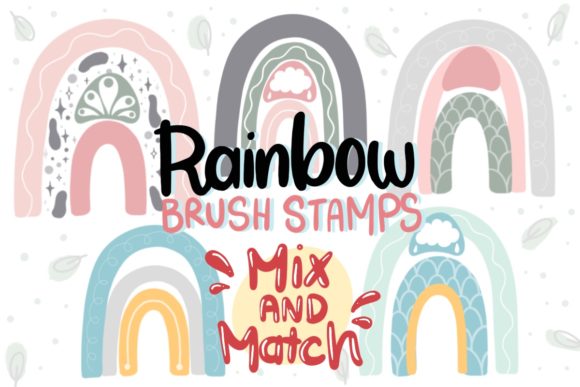
One of the most compelling features of advanced brush sets is the ability to customize. The specific Rainbow brush set discussed here offers a unique "mix and match" capability. The package typically includes a ZIP file containing a specialized brush stamp set where the rainbow elements are separated into layers.
Imagine having a toolkit where each layer contains three distinct patterns, totaling twelve unique base designs. By combining these layers within the Procreate interface, you are not limited to just twelve outcomes. Through permutation and combination, you can generate more than 100 patterns. This exponential growth in design options is crucial for businesses and artists who need variety without creating every asset from scratch. It allows for the creation of cohesive yet diverse collections, perfect for product lines that need to look related but distinct.
Practical Applications in Modern Business and Life
The utility of these Procreate tools extends far beyond simple doodling. In today's gig economy and creator-driven market, the ability to produce high-quality visuals quickly is a competitive advantage. Here is how these rainbow brush stamps fit into various sectors of modern life:
- Merchandise Design: The demand for personalized goods is at an all-time high. These brushes are optimized for use on mugs, T-shirts, and tags. Because the files are high-resolution and scalable, they ensure that the vibrant rainbow gradients remain crisp whether printed on a small sticker or a large tote bag.
- Packaging and Branding: Small business owners often struggle with creating eye-catching packaging. A rainbow brush stamp can serve as the primary visual element for product boxes or shipping labels, conveying a sense of fun, inclusivity, and energy that resonates with consumers.
- Home Decor and Wall Art: Interior design trends frequently shift toward bold, colorful statements. Artists can use these stamps to create abstract wall art prints that bring life to a neutral room. The ability to layer colors allows for depth and texture that mimics traditional painting techniques.
- Digital Assets: For web designers and social media managers, these brushes are invaluable for creating engaging stories, posts, and digital stickers. The "instant download" nature means you can react to trends immediately, deploying new graphics within minutes of inspiration striking.
Clarifying Common Misunderstandings
Despite their popularity, there are often misconceptions surrounding digital Procreate add-ons. It is vital to clarify what you are purchasing to ensure satisfaction.
1. It is a Digital File, Not a Physical Product:
When you purchase this set, no physical item will be shipped. You are buying a license to use the digital code that generates the brushes. Upon purchase, you receive an instant download link. This immediate access is a benefit, allowing you to start creating seconds after buying, but it requires the user to have the correct hardware (an iPad) and software (Procreate).
2. Compatibility Matters:
These files are designed specifically for the Procreate ecosystem. While Procreate is powerful, it does not natively support Photoshop brushes (.abr) without conversion, and these specific stamp sets are optimized for Procreate's rendering engine. Users must ensure their software is updated to avoid compatibility issues.
3. Watermarks and Quality:
A common fear among buyers is receiving preview images instead of the actual tool. Rest assured, the delivered ZIP file includes the functional brush files without watermarks or shadows. The promotional images you see online often have watermarks to protect intellectual property, but the product you use for your T-shirts, cards, or packaging will be clean and professional.
How to Get Started: A Step-by-Step Overview
Integrating these tools into your workflow is straightforward, even for beginners. Here is a logical path to mastering your new rainbow brush set:
- Download and Unzip: After your instant download, locate the ZIP file on your iPad (usually in the 'Files' app). Tap it to extract the contents. You should see the .brush or .brushset files inside.
- Import to Procreate: Open Procreate and tap on any brush in your library to open the Brush Studio. Alternatively, simply tap the downloaded .brushset file in your Files app, and it will automatically import as a new folder in your brush library.
- Explore the Layers: Open the included guide or reference sheet (if provided) to understand the 12 base patterns. Remember, these are separated layers meant for interaction.
- Experiment with Blending Modes: To truly unlock the "mix and match" potential, try changing the blending mode of your brush strokes in the Layers panel. Switching from "Normal" to "Multiply," "Overlay," or "Screen" can drastically alter how the rainbow colors interact with your background.
- Create Your 100+ Patterns: Start combining strokes. Overlap different stamps, rotate your canvas, and vary your pressure. Document your favorite combinations to build your own personal library of go-to designs.
The Broader Impact on Creative Education
Beyond commerce, tools like the Rainbow brush stamp play a significant role in education. For students learning color theory, these brushes provide an instant visual feedback loop. They can experiment with how primary colors blend to form secondary hues in a digital space without the mess of physical paints. Furthermore, for those studying graphic design, understanding how to utilize pre-made assets efficiently is a critical professional skill. It teaches the balance between original creation and the strategic use of resources to meet deadlines.
In conclusion, the Procreate Rainbow Brushes Stamp set is more than just a collection of pretty colors; it is a versatile engine for creativity. By offering the ability to generate over 100 unique patterns from a single download, it empowers users to scale their production for stickers, home decor, and apparel with ease. Whether you are launching a new brand or simply decorating a digital journal, these tools bridge the gap between imagination and execution. As the digital landscape continues to grow, embracing such efficient, high-quality Procreate tools ensures that your artistic voice remains loud, colorful, and distinctly yours.
Remember, the key to mastering these tools lies in experimentation. Don't be afraid to break the rules, layer aggressively, and discover patterns that no one else has seen before. Your next masterpiece is just a stamp away.