Botanical Pattern Procreate Brushes for iPad
There is a distinct satisfaction in watching a seamless pattern emerge from a single stroke, transforming a blank canvas into a lush, living texture without the tedious repetition of copy-pasting elements. For digital artists and designers working on the iPad, the Botanical Pattern Procreate Brushes set offers a streamlined pathway to achieving this organic aesthetic. These tools are not merely stamps; they are digitally hand-drawn instruments designed to replicate the nuance of nature while leveraging the efficiency of modern software. Whether you are crafting a brand identity for an organic skincare line or designing custom wrapping paper for a boutique shop, understanding how to utilize these specific brushes can significantly elevate the quality and speed of your workflow.
At their core, these brushes are engineered exclusively for the Procreate 5X ecosystem on the iPad. It is crucial to note that this specificity is a feature, not a limitation. By focusing entirely on the Procreate engine, the brush dynamics—such as pressure sensitivity, tilt response, and streamline stabilization—are fine-tuned to interact perfectly with the Apple Pencil. This synergy allows for a drawing experience that feels intuitive and responsive, capturing the subtle variations in line weight that mimic real botanical illustrations. However, potential users must be aware of the technical boundaries: these brushes are not compatible with Adobe Photoshop, Illustrator, or any desktop-based raster or vector software. They require the iOS environment to function, ensuring that the complex coding behind the seamless pattern generation runs smoothly without cross-platform conflicts.
The Art of Digitally Hand-Drawn Nature
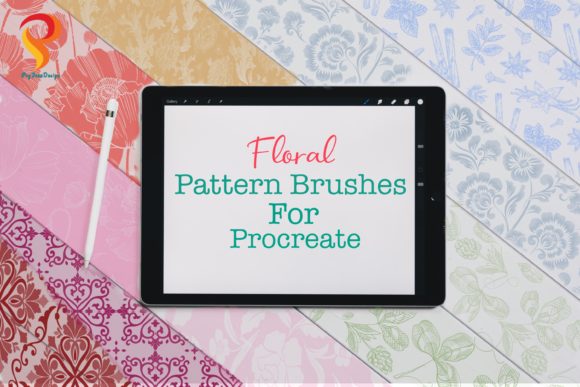
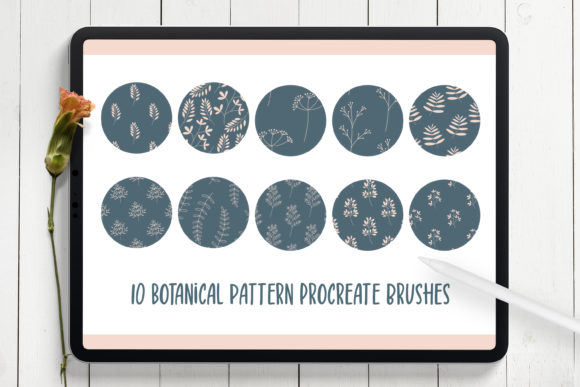
What sets this collection apart from generic pattern generators is the origin of the artwork. Each element within the Botanical Pattern Procreate Brushes library was individually hand-drawn before being digitized. This process preserves the imperfections and organic flow that make botanical art so appealing. Unlike algorithmic patterns that can feel rigid or overly symmetrical, these brushes introduce a natural randomness to your work. The set includes ten unique seamless pattern brushes, each featuring different plant-inspired motifs ranging from delicate ferns and trailing vines to robust monstera leaves and wildflowers.
When you select one of these brushes and swipe across your canvas, the software automatically tiles the design, creating an endless background that requires no manual alignment. This capability is particularly valuable for creators who need to fill large areas quickly without losing resolution or detail. The result is a cohesive, professional-looking texture that serves as an excellent foundation for various creative projects. Because the source art is high-resolution and carefully crafted, the patterns remain crisp even when scaled up for larger prints, provided you are working within a sufficiently large canvas size in Procreate.
Practical Applications for Professionals and Hobbyists
The versatility of these brushes extends far beyond simple background creation. For entrepreneurs and small business owners, branding is everything. Imagine launching a line of herbal teas or eco-friendly candles; using these botanical brushes to create custom packaging designs can instantly communicate a connection to nature. You can generate unique textures for labels, boxes, and promotional materials that stand out against the sea of stock photography often used by competitors. Similarly, wedding planners and stationery designers can utilize these tools to craft bespoke invitations and save-the-date cards. The ability to layer different botanical brushes allows for the creation of complex, framed borders or full-bleed floral backgrounds that feel personal and artisanal.
In the realm of digital content creation, bloggers and social media managers can leverage these assets to maintain a consistent visual theme across their platforms. Creating story highlights covers, post backgrounds, or Pinterest graphics becomes a swift process when you have a library of ready-to-use, cohesive patterns. Educators and publishers looking to produce engaging worksheets, planners, or journaling templates will also find immense value here. The organic shapes provide a calming aesthetic that enhances the user experience for anyone interacting with the final printed or digital product. Even hobbyists who enjoy digital scrapbooking or creating custom stickers for personal use will appreciate how quickly these brushes allow them to decorate their projects with professional-grade flair.
Maximizing Efficiency and Workflow
Time is a critical resource for freelancers and agency professionals. The primary benefit of integrating Botanical Pattern Procreate Brushes into your toolkit is the dramatic reduction in production time. Traditionally, creating a seamless pattern involves drawing a motif, duplicating it, aligning edges, and manually filling gaps—a process that can take hours. With these brushes, that same result is achieved in seconds. This efficiency does not come at the cost of quality; rather, it frees up your mental energy to focus on composition, color theory, and overall design strategy. You can experiment with different color palettes and layering techniques rapidly, iterating on ideas until the perfect look is achieved.
Furthermore, the file delivery system is designed for ease of use. Upon purchase, you receive a single ZIP file containing one .brushset file. This consolidated format simplifies installation; once imported into Procreate, all ten brushes appear instantly in your library, ready for immediate use. There is no need to manage multiple folders or hunt for individual assets. This streamlined approach respects the user's time and reduces the friction often associated with setting up new digital tools.
Technical Considerations and Best Practices
To get the most out of this toolset, certain hardware and software prerequisites must be met. As previously mentioned, an iPad running Procreate 5X is mandatory. Older versions of the app may not support the specific rendering engines used in these brushes, leading to glitches or non-functioning tools. Additionally, while finger painting is possible in Procreate, the precision and pressure control offered by the Apple Pencil are essential for fully utilizing the dynamic capabilities of these botanical brushes. The tilt and pressure features allow you to vary the density and opacity of the foliage, adding depth and realism to your patterns that touch input simply cannot replicate.
It is also important to manage expectations regarding file compatibility. If your workflow involves moving files between Procreate and desktop applications like Photoshop for final touch-ups, remember that the brushes themselves will not transfer. You must rasterize your pattern layers in Procreate before exporting the image as a PNG, JPEG, or TIFF to use in other programs. Once exported as an image file, the pattern is universal and can be placed into any design software, but the editable brush strokes remain exclusive to the iPad environment. Understanding this distinction prevents frustration and ensures a smooth transition between devices.
In conclusion, the Botanical Pattern Procreate Brushes represent a specialized, high-value asset for anyone invested in the Apple creative ecosystem. They bridge the gap between the charm of traditional hand-drawn illustration and the demands of modern digital production. By offering a quick, reliable way to generate stunning, nature-inspired textures, they empower creators to produce higher volumes of quality work with less effort. Whether you are building a brand, decorating a home, or teaching a class, these tools provide the organic elegance needed to make your visual communications resonate with your audience.